Contrast

Apple and Samsung take contrasting approaches to advertising for two similar products – the iPhone 5 and the Galaxy S4.

Apple’s advert is aspirational, focussing on the user and how they get most out of the device and it’s app’s. It appeals to different type’s, from runners to food bloggers, travellers to kids. For me it’s one of their best adverts in years.

Samsung focus on their product but can’t do so without some unfunny dialogue and dinging the competition. Comes across as cheap. Maybe they aren’t trying to target me but that style of advert is a total turn off.

While Samsung have consistently copied the competition when it comes to their products I’m glad that hasn’t extended to their advertising campaigns. Yet.

Mac Updates

I picked up my iMac back in 2011. As usual with Apple products I ordered the smallest RAM possible and picked up some Crucial to take it to 16GB. At the same time a colleague was also buying an iMac so I passed on the Apple RAM at a low cost to him as it was no use to me. That was my first mistake.

Over the last year I was getting infrequent crashes, every 2-3 weeks, almost always when iTunes was running. I put it down to software and looking at the crash dumps I was always drawn to a graphics card driver issue. I dismissed it as that, hoping an OS X update at some point would resolve it. It didn’t. That was my second mistake.

At Christmas I dug deeper, downloading a memory module checker and checking the RAM chips individually. Turns out I had some faulty RAM and that was something that I had introduced to the system. I bought some replacements (RAM is ridiculously cheap now) and in the last three months I have had zero crashes. Happy days but a lesson learnt. I’d still recommend buying a Mac with the minimum amount of RAM assuming you can easily replace it, but keep the Apple original in case your replacement chips are faulty and if you ever have to return the Mac to Apple.

One aspect I’ve loved with the iMac is the screen. 27 inch and with a resolution of 2560×1440 it’s been a joy to use. Despite it’s size though, I’ve often wished for more. A second screen would really help day to day and especially with the podcast. After thinking and researching for a while I finally plumped for the Asus PB278Q.

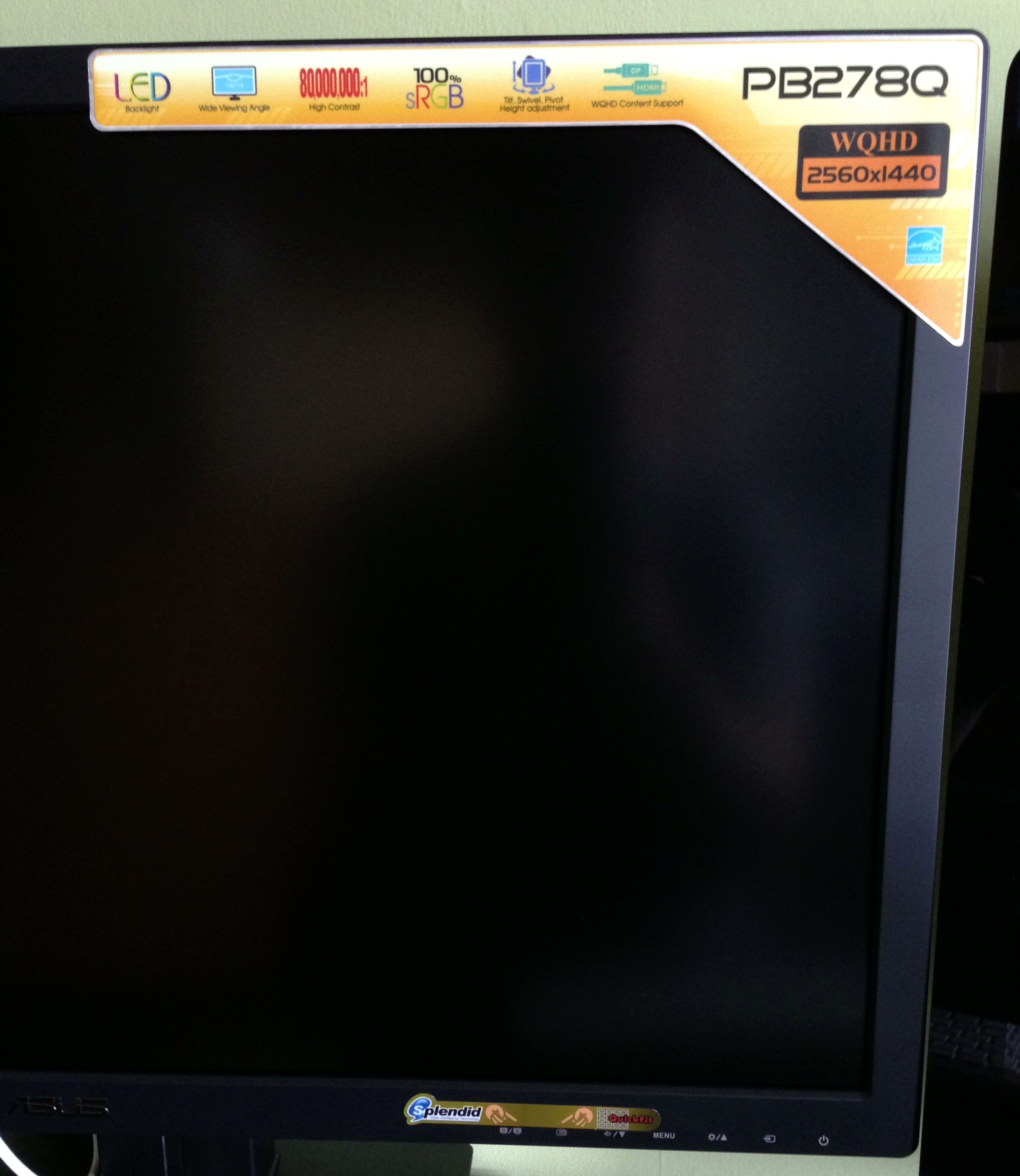
Why do manufacturers persist with tacky stickers?
I’m quite picky about the kit I use and while it would have been fine I’d have always been a bit ticked off with a physically smaller second screen or one with a lower resolution. The Asus is a 27 inch screen which is the same size as the iMac and also shares the same resolution – 2560×1440. Another obvious choice would have been the Apple Thunderbolt Display but that costs £899 and has no flexibility when it comes to adjusting screen height. The Asus is fully adjustable and can be rotated 90 degrees too. It also cost £467 from Amazon which is a massive difference to the Apple Thunderbolt. Other options were from Dell and Samsung. Although Dell have been making monitors for years looking at recent reviews and also customer comments on Amazon there seems to be an issue with quality control and although most were happy with the product, there were too many who had real issues with their monitors. As for Samsung, it didn’t look the best, the Asus had far better reviews…and it was a Samsung :-). First impressions out the box were good. Design wasn’t a patch on the iMac but it was sturdy with a good base. The only initial negative was the garish stickers that PC manufacturers love to put on cases, laptops and monitors. Thankfully they were easy to remove leaving just the button indicators, the ASUS logo and the unnecessary HDMI and DisplayPort logo’s on the front. When will they learn. The material is black matte plastic and although the bezel is a touch larger than I would have liked, it does melt into the background in use.

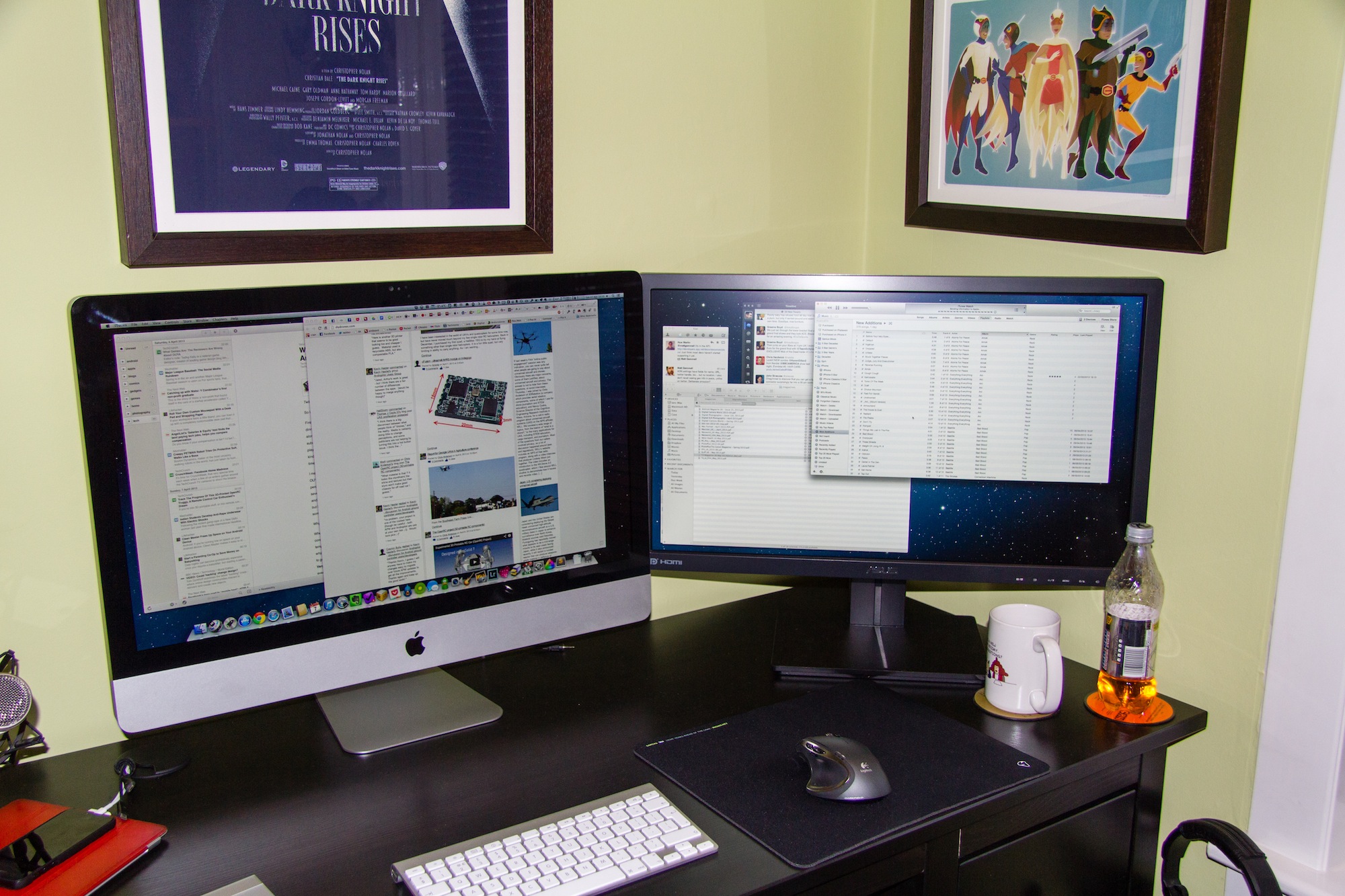
iMac and Asus
iMac and Asus – look small in the pic but they are both 27 inch screens

The Asus comes with lots of connectivity options – HDMI, DisplayPort, VGA and DVI and admirably comes with a full set of cables in the box. However for the iMac I needed an mini-DisplayPort to DisplayPort but there are some great sub £10 options on Amazon. Setup was easy. Plugin the cable, power up the monitor and the iMac auto detected the screen and enabled an extended desktop giving a total resolution of 5120×1440. Thats a lot of pixels and brings me to my biggest fear when it comes to screens. Dead pixels.

I shouldn’t really check as chances are in day to day use it would be unnoticeable…unless you go hunting, but hunting I went. Happily the Asus has no dead or stuck pixels. The screen itself is more matte than the iMac so reflections are much reduced. As for the screen itself I think it’s excellent. Clear and crisp, no noticeable lag with my ageing eyes and I can use it easily all day long without any tiredness. Applications were well sized, nothing too small or unclear and full screen video was crisp and clear – no smearing that I could see. I don’t really game too much on the Mac although have been bitten by the emulator bug over the last couple of weeks, but that’s for another post, but the games I tried all played well.

The menu controls are easy to use and give you full control over screen colour, brightness etc and also allow you to flick between a number of presets. It was straightforward to match the iMac display so it looked roughly the same to my eye’s. You can also control audio levels as the monitor has built in speakers which are ok, but nothing spectacular. You can alter menu positions, menu language and also turn off the power light indicator which makes the display on the front of HDMI and DisplayPort logo’s even more annoying. I might have to find some black tape. Apart from that I’ve nothing more to say technically about the monitor and I’ll point you to TFT Centrals review of the PB278Q which is incredibly detailed and covers all aspects of the monitor. Suffice to say, they liked it.

I’ve had the monitor for a week now and love it. It’s a luxury purchase but delivers a big gain in productivity. 2 years ago I was sure I didn’t need anything more than a 27 inch monitor, I’m now pretty sure that I don’t need a third monitor…but in 5 years time will it be two retina monitors? Time will tell.

Podcasts

I was asked recently what podcasts I listen to, so in alphabetical order…

  • Above & Beyond: Group Therapy (iTunes link) – Weekly 2 hour mix show, highlighting the finest in trance. Great for getting through boring tasks at work. We all have them!
  • Accidental Tech Podcast (iTunes link) – Relatively new technology (especially Apple) podcast featuring Marco Arment, Casey Liss and John Siracusa. Can go deep on topics but really enjoyable so far.
  • All About Android (iTunes video link) – Weekly show that features news and app’s from the world of Android. Great way of keeping up to date.
  • Answer Me This! (iTunes link) – Helen and Olly, answer me this….funny and rude – a must listen.
  • Before You Buy (iTunes video link) – Gadget review show which can be a bit hit and miss depending on reviewer.
  • CMD+Space (iTunes link) – A tech interview show from Myke Hurley. Had a great run of guests making this a really enjoyable show – Myke has real skill at getting the most out of his guests too.
  • The Crossover (iTunes link) – Hosted by Dan Benjamin and featuring a variety of hosts from 5by5 discussing…anything. Great episodes so far.
  • Fighting Talk (iTunes link) – Colin Murray hosts, 4 guests from the world of sport and 50 minutes of comedy gold.
  • Foundation (iTunes video link) – Kevin Rose interviews founders, entrepreneurs and business leaders in the tech community. Roughly a monthly release cycle, Rose has had access to some great people over the years.
  • Frame Rate (iTunes video link) – How to watch Internet TV and what’s worth watching right now. Tom Merritt and Brian Brushwood are great hosts.
  • Friday Night Comedy from BBC Radio 4 (iTunes link) – Topical news quiz featuring The News Quiz or The Now Show. Much prefer the News Quiz hosted by Sandi Toksvig.
  • In Beta (iTunes link) – Podcast on tech culture, open source and web apps. Not just a tech news podcast and some interesting topics covered.
  • Invisible Walls (iTunes video link) – Videogames podcast, a bit hit and miss but best of a bad bunch.
  • Mac Power Users (iTunes link) – Hosts Katie Floyd and David Sparks take one topic each week and discuss it in detail. Mac focussed and some great software links and tips to get the best out of your Mac.
  • MacBites (iTunes link) – MacBites is hosted by Elaine Giles and Mike Thomas and is that rare beast – a UK podcast! Informative but great fun at the same time – I love it. Weekly but with frequent breaks, their absence kicked me into doing DigitalOutbox.
  • Macbreak Weekly (iTunes video link) – A once classic podcast when Merlin Mann took part, stil watchable thanks to Andy Ihnatko and Rene Ritchie. Can go long…too long.
  • The New Disrupters (iTunes link) – Hosted by Glenn Fleishman this podcast focusses on how the economy is changing and each week he interviews a disrupter who is taking advantage of the new economy.
  • On The Verge (iTunes video link) – Monthly video magazine from The Verge, part gadget reviews, part chat show with great guests.
  • Shift Run Stop (iTunes link) – Much loved and much missed, a geek/comedy podcast hosted by Leila Johnston and Roo Reynolds. Tech, gaming, geek culture, UK based and two delightful hosts. And fun.
  • The Talk Show (iTunes link) – Hosted by John Gruber each week he discusses mostly Apple related subjects with a guest or two. Miss the old days with just him and Dan Benjamin.
  • Tech Weekly (iTunes link) – Well produced weekly tech podcast from the Guardian.
  • TEDTalks (iTunes video link) – TED talks, some great, some not so but always informative
  • This Week in Google (iTunes video link) – Jeff Jarvis and Gina Trapani discuss Google and cloud computing in general. Jeff is great – really refreshing voice.
  • This Week in TECH (iTunes video link) – Can go long and is very much dependant on the guests but is generally a good round up on the weeks tech news.
  • Top Shelf (iTunes video link) – David Pierce from The Verge looks at a variety of tech and gadget issues. New but good so far.
  • Unprofessional (iTunes link) – Dave Wiskus, Lex Friedman and guests discuss anything. Very good.
  • The Vergecast (iTunes video link) – Weekly tech and gadget show from The Verge.
  • The Wired.co.uk Podcast (iTunes link) – Weekly tech and science podcast from Wired UK that keeps getting better and better.

So thats what I currently subscribe too. I dip into others as they are linked or mentioned elsewhere and of course I couldn’t write a post on podcasts without mentioning DigitalOutbox in which you can hear my good self and friends ramble on about the weeks tech news but with a distinctly UK focus.

I love finding new great podcasts so if you think there is something I would like please leave a link in the comments.

Bombermine

I’m really enjoying Bombermine. Take Bomberman, tweak the rules, make it playable via a browser….and allow up to 1000 players to join a room. It is so much fun and makes me yearn for games of old.

Bomberman more than any other game reminds me of my University years. A Super Nintendo with a multi-tap and usually Richard, Lewis and Dave (speedy boots) all suspecting that I was cheating to get the hand each and every time I was golden bomber. Honest – no cheating:-)

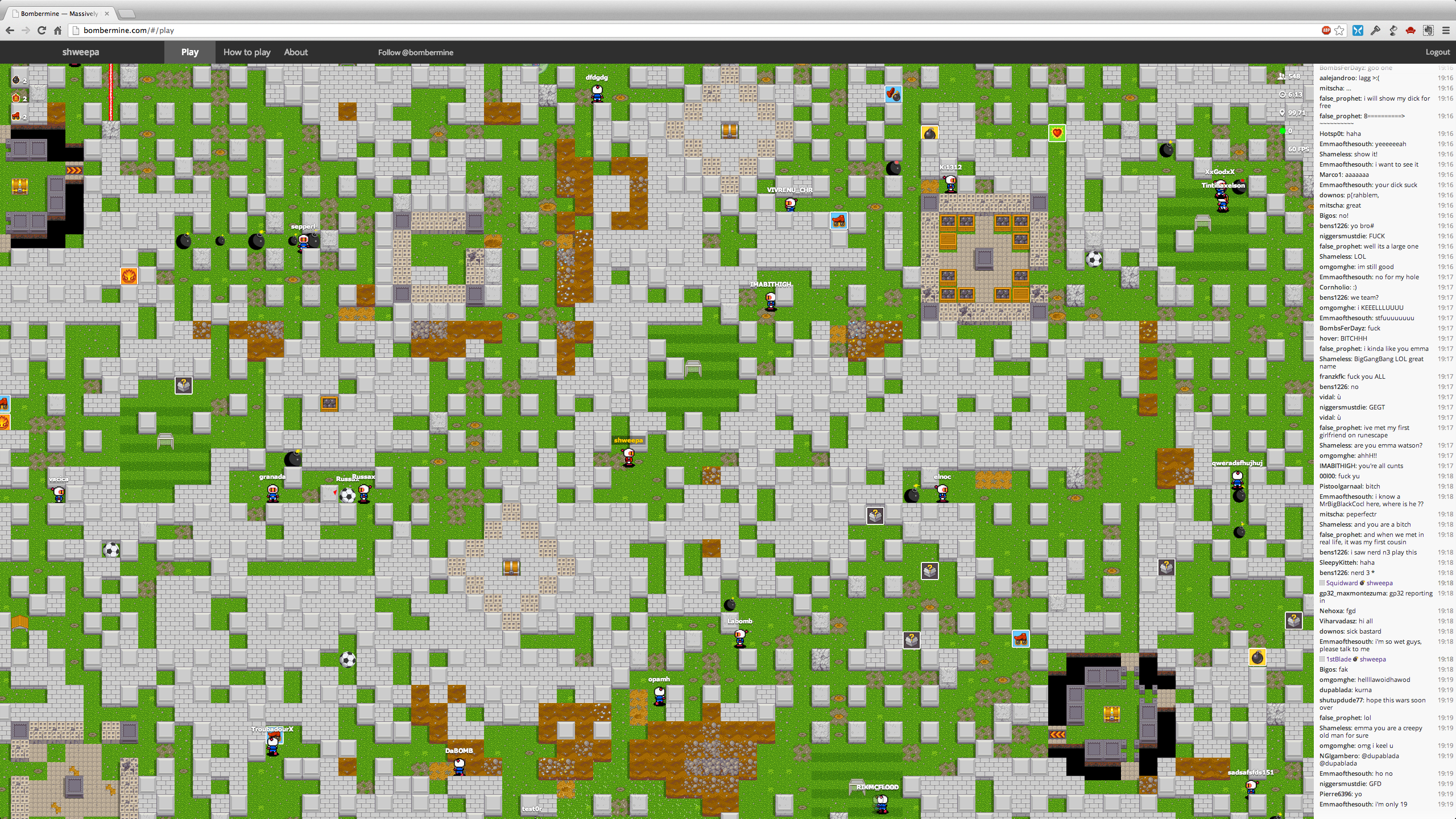
So Bombermine can lag sometimes and it can be really random at times but I was enjoying it all the same. Then it hit me. It’s running in the browser. A browser that can go full screen. Full screen on my iMac is 2560×1440. It wouldn’t still be playable would it?

I’ve uploaded that at full resolution so if you can view it at it’s native resolution rather than 1080p. It’s amazing when you see so much running while remembering it’s all in the browser. If you don’t want to watch the video, at least click on the screen below to see it in all its glory. There’s also some support for gamepads.

Click to view full screen - looks great
Click to view full screen – looks great

It’s given me an itch to crack out the emulators and pay some classic games – Pilotwings, F-Zero, Zelda etc. When games were fun.

Pebble Dashed

The Pebble was the first campaign I backed on Kickstarter. It was April 2012 and the Pebble was a breath of fresh air. A watch that would talk to your phone, iOS or Android, that was updatable, not too large, had a good battery life and was affordable at around $100. There wasn’t much not to like so I backed it without much hesitation. It was geeky but I love geek toys!

Despite missing a couple of delivery dates the Pebble team have delivered on their oversubscribed Kickstarter and on Thursday my watch finally arrived. Kudus to the team as they have kept everyone up to date on progress their problems and issues of scale that I’m sure they didn’t expect just under a year ago. So after a couple of days how does the Pebble deliver?

The Good
The watch itself is light and feels good in the hand. It has one button the right hand side and three buttons on the left. The buttons are used to navigate around the menus, dismiss notifications, turn on the backlight etc. The buttons need a firm press to operate which I’d expect to ease over time but gives confidence that the watch is well made.

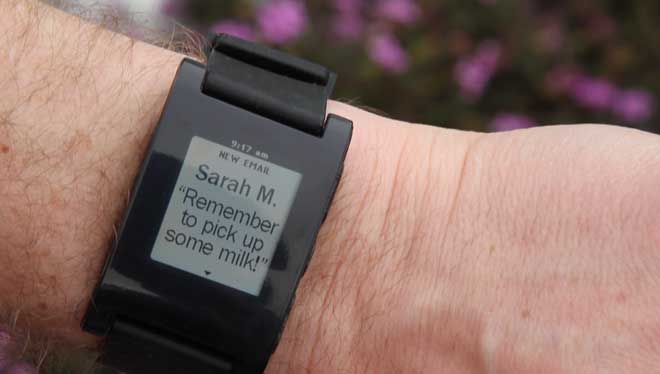
Pebble notification
Pebble notification

The Pebble has to well made as it’s waterproof hence the contact power connector. Powered via USB the cable attaches via magnets and powers the Pebble quickly. Battery is rated at 7 days and as I haven’t had it that long it’s hard to know if it’s accurate – it’s still going strong after three days so the signs are good.

The Pebble is easy to connect to your phone on iOS or Android. Via Bluetooth you pair the phone with the Pebble and…thats it really. On iOS you need to make sure that Notifications are enabled and setup properly. For me it’s worked well but it’s a bit of a pain and not the best setup experience. That’s not Pebble’s fault – iOS is more locked down than Android so you won’t get everything you expect. It can also disable if the devices go out of range which I’ve seen once. Pebble have a useful page to help with iOS setup. The music app worked really well – skip tracks, pause – all good.

On Android the Pebble app works differently in that everything routes through the app and it runs permanently. More seems to flow through on Android but it does feel a bit of a hack to get the most out of Pebble.

Speaking of hacks to get all iOS notifications then you can jailbreak your iPhone and from Cydia install BTNotificationEnabler by Conrad Kramer. So instead of just Messages, Phone and Music you will get Tweets, mails – everything. It’s an impressive hack and with the recent evasi0n jailbreak it’s an easy method of improving the Pebble on iOS.

The Not So Good
The screen is clear but duller than I expected. The backlight helps but switches off quickly. It’s also quite blue with the backlight on but thats not a biggie. The viewing angle is narrower than I’d expected but really is fine, just not great.

The strap is a bit industrial but as it’s a standard size it’s easily replaced. Also industrial is the Pebble itself. While not massive like some of the GPS walking/running watches it’s quite tall. Certainly on my wrist I found it quite uncomfortable especially under a work shirt finding it awkward to see the full notification and then clear it.

Pebble Icon
Pebble Icon

Pebble gets it update via the software installed on the phone. With an update every couple of weeks planned by the Pebble team you can be sure of a watch that will only get better. That doesn’t get away from the fact that at the moment it’s use is limited. The one feature that really appealed to me was RunKeeper support which unfortunately isn’t yet available. In fact from the Pebble front page it’s only notifications and Music that is available.

The menu on the Pebble itself is at best utilitarian but is in need of updating. Clock faces are listed in the top menu alongside Music and Settings. The faces really need their own menu as adding a new clock face clutters up the menu.

One last software issue is that there is no battery indicator. While the watch lasts for seven days without an indicator you have no real option but to charge more often than is probably necessary. Seemingly the battery only appears when it needs charged, but thats no use if you are away for a couple of days and it appears on the second day. For Pebble to succeed it has to be trusted and I can see a future update enabling a visibile battery indicator, or at least a way of checking it in the menus.

Verdict
The Pebble is a great watch. It has so much potential and for a first product the team should be rightly proud. However now that they are shipping hardware in volume they need to focus on delivering app’s and polishing the software. Without that users will quickly tire and the danger is an Apple, Google or Samsung will come along and almost instantly kill their product.

For me the Pebble in it’s current form has parallels to the first iPhone. It was clearly a wonderful phone but without 3G and app’s it wasn’t enough for me to buy…and thats how I feel about the Pebble. Right now the form factor and usability coupled with the lack of app’s means it’s not for me so I’ve sold mine on eBay. However I wouldn’t rule out picking up a future Pebble or smart watch from another provider. Imagine a watch that could do everything that the Pebble does coupled with a Fitbit and a slightly better screen. Add in a touch screen and I’d be first in line. It will be interesting to see where the wearables sector grows to over the next 2-3 years and whether it’s a market just not for geeks. Is the smartphone good enough for the majority of users?

Excuses Excuses

I need another app. Something simpler, something that I can access anywhere. Something to manage my to-do’s. Also need to get my notes sorted, lists etc etc. So I started looking. Maybe Wunderlist, maybe a return to Remember the Milk but nothing seemed to stick. I then read that Apple were doing a promotion on productivity app’s. Maybe I should try Things now that they’ve got cloud syncing sorted?

Does anyone think that this is a great design for an online store? So ugly. Sort it Apple.

Bollocks. Total and utter bollocks.

Instead of, you know, actually doing stuff with the app’s I’ve got I’m pissing around procrastinating. It’s a trap I’ve fell into before and it’s easily done. Mess around looking for a better tool rather than using what I’ve got. Or stopping to use duplicate app’s and settling down on a few core tools.

So Omnifocus will be used for to-do management. It’s iPad app is far better than the Mac client but version 2 is coming soon (and if you are interested in giving it a try there’s a temporary licence available from Omni while waiting for version 2). As for read it later services, Pocket is now my only app. More versatile than Instapaper and available everywhere. Pinboard has become my link saver of choice. Clean and fast and again there are clients on all platforms plus the web. Finally Evernote is for everything else. PDF’s, manuals, guide’s, recipes, audio notes, web pages, scans…the list is endless and I’m making full use of my premium account.

While I’ll still take a passing interest in similar tools I’ll spend more time being productive rather than shifting from app to app. As a certain Raven Storm used to say, focus…or was it concentrate!

2013

Another year has dawned but unlike previous years no resolutions from me. Last years were all a fail due to a variety of reasons so thats brought my public declarations to a crashing halt. The good news is that I weigh less than I did a year ago. Just. The continual weight challenge is still on.

So Happy New Year and all the best for 2013…and if you missed the soundtrack from the fireworks display at London last night then enjoy this. Capped of a great year to be British.

Android

I’ve been an iOS user for 5 years now which is natural as I also use Macs. I love the devices and software but in doing the podcast and seeing so much momentum with Android I had an itch – I really wanted an Android device to play with. I didn’t want a phone as that would involve a contract and I didn’t want a device that had a companies UI grafted on top of vanilla Android. So when the Nexus 7 was launched it seemed to be the ideal device for me to get. The price drop/increased spec’s at the start of November made the choice even easier so I picked up a 32GB Nexus 7 in the middle of November.

As I already have a iPad and iPhone 5 (both new this year) it’s definitely a luxury purchase as it wasn’t as if I had a gap in my gadget library but it has allowed me to compare the different form factors and understand their strengths and weaknesses. What I was most interested in was the software – how good is Android now that Jelly Bean (Android 4.2) is launched and how strong is the third party support? I hate the iOS vs Android posts on the web as the two camps are so entrenched it’s hard to get a view that’s accurate. At least buying the Nexus means I can form my own view and I can also be more informed about Android. I’m also a geek so it was a brand new device and ecosystem to enjoy.

Nexus 7 Hardware

Nexus 7
Nexus 7
I’m not going to cover the Nexus 7 hardware in detail but just mention some highlights. For a full review I’d read The Verge review from June 2012. So what do I like about the Nexus 7?

  • Ever since Steve Jobs dissed the 7 inch form factor there has been a debate about their value. For me the 7 inch Nexus is an excellent size for a tablet. I can hold it in one hand and read from it easily. I’ve not had an issue with touch points or that my hands are too big for the screen. Indeed Apple bringing out the iPad Mini shows that Jobs ire was more to do with competition to the iPad rather than a 7 inch tablet is too small.
  • The screen quality is excellent. Much is made of retina screens but I find the text quality on the Nexus 7 is great. No eye strain and no visible pixels either. The screen is 216 ppi which is less than the 264 ppi that the iPad has but similar to the Macbook Pro which has a ppi of 220. One point to note is the screen felt washed out at first. I found that having the brightness set to automatic set it far too low and my current setting is around 40-50% which is ample for me. Video playback is excellent too – it’s a great device for watching video’s on but more of that later.
  • The weight is excellent. I think this is the biggest advantage over an iPad. I can hold it in one hand, I can read easily on planes, at work or around the house without getting arm fatigue and unlike the iPad the weight is just not an issue. It also feels good in the hand with a grippy dimpled plastic back which makes it less likely that you’ll drop the Nexus.
  • Overall build quality is good but not quite to the same standard as Apple but it is a lot cheaper that the iOS devices. It never feels cheap though – considering it’s only £160 for the 16GB version it’s a steal at that price.
  • Landscape mode isn’t the best. It feels squashed and I find it difficult to work in that orientation unless it’s for watching a film. Limitations of a 7 inch tablet with this form factor.
  • The 7 inch tablet is great for reading, watching video, Twitter et all but I do have issues with it as a work device or content creator. The iPad can do all those things but I found the screen just to small in landscape to create anything useful. Another issue is the lack of software written specifically for Android tablets. More on that later.

Continue reading “Android”

What price free?

It’s been an interesting week for Instagram users. First the company change their terms and conditions and make it pretty clear that adverts are coming and that they will be able to use your photo’s in adverts that they serve. They don’t quite say they are selling your photo’s but for me go pretty damn close. This caused quite a commotion ranging from chatter on Twitter that it’s time to go through to a discussion on Newsnight. Really?

A day later Instagram tried to clarify the position via a wordy blog post, acknowledging that their legal speak had caused confusion for it’s users but don’t worry, we will make the language easier to understand. Meanwhile we will change the terms a bit so it doesn’t appear to be such a major change. Sneaky?

This was a long time coming. Facebook didn’t pay $1 billion purely to stop competition. They have to make that money back somehow and advertising is just one of the ways that they will do that via Instagram. So as a user what choices do you have? Either suck it up and continue to use Instagram or leave and use something else. That’s it. And it’s clear many are leaving because on deleting my account this morning Instagram are actually linking to their clarification blog post.

Instagram now linking to their clarification statement on changes. Seeing a few users leaving?

For me it’s exactly the same as Twitter where they are changing the service into something I don’t want in order to make money but won’t let me pay for something I do want – the service as it stood a few months back. This is the danger of free. Free web services will alter/pivot to suit advertisers and not their customers.

While I have much to say on this topic, Gordon has blogged about this already and covered much of my views so go and read his post and then come back here for some conclusions.

So my Instagram account has been deleted. This is no biggie for me as I took only 14 photo’s via the app. If you’ve taken hundreds and made lot’s of contacts then I can see why it’s not so easy to leave. I’ve had a Flickr Pro account for 7 years and despite looking at 500px, self hosting and new options like openphoto (they have a nice import feature so you can copy photos from Instagram, Facebook and Flickr like I’ve done here) I’ve stuck with Flickr. With the new iOS app update I’m glad I did and I’m hopeful of future improvements down the line. I’ve too much invested to make the move trivial.

Aside from privacy concerns my main problem with Instagram was always fragmentation. I want all my photo’s in one place, and as I was a Flickr user, that one place wasn’t Facebook or Twitter. I never felt a compelling reason to use Instagram. Yes the filters were great and it made it really easy to take and upload an image and also see your friends photo’s and comments quickly, all in one app. Flickr missed a trick in taking 2-3 years to release a decent iOS application. In fact Flickr has been missing a trick since Yahoo bought them but thats a whole other topic. But for me I never got the Instagram bug. I tried but it never clicked.

The lesson for me is to try and stop jumping from app to app, service to service. I pay for Evernote, iTunes Match, Flickr, App.net, web hosting and share my data via Dropbox and iCloud. There’s probably more that I pay for that doesn’t spring to mind which is a problem in itself. App.net shows lots of promise but I have two issues. One is that many of the people I interact with on Twitter haven’t moved which I expected but it has made it far less sticky for me. The second is my time – I find it hard enough to keep up with Twitter (cull coming soon) but adding a second similar social network on top is a time sink. However I need to make more effort with App.net – maybe a Netbot for Mac would help? Even writing that ‘I need to make an effort’ tells me that App.net isn’t working for me. Mmmm.

Will I go all paid like Gordon is musing? It’s probably heading that way. I use Google App’s for all my domains and the podcast and would happily pay a fee each year to keep using those services. Same with Gmail – I’d have no issue paying for a great e-mail service. Where paying get’s frustrating is when iTunes Match goes through a flaky patch yet Googles similar but free service has worked without a hitch so far although I’d expect Google to charge at some point or start showing some ad’s. The excuse that Apple doesn’t get web services is wearing thin.

If I get a great reliable service then I will happily pay – Xbox Live for example has been really good over the years and it’s a service I have no objection to paying for. What I will be doing is shutting down the accounts that I’ve created over the years that I just don’t use anymore. Last.fm jumps to mind – scrobbling from everywhere used to be important to me but not anymore. I will also try and stop signing up to everything shiny and new. Honest.

Well, thats a lie really as I’ve signed up to three new services in the last day or so. When will I learn.