Blog

Thoughts on Lion

Mac OS X Lion was released on July 20th 2011 so my write up is after a few weeks of use rather than a few days (although many were based on using the beta releases that developers have access too). It’s also on the back of a couple of great posts in a similar vein, Elaine Giles Lion – One Month On and Craig Grannell’s My review of OS X Lion: the good, the bad and the ugly. Both posts highlighted the good and bad to be found in Lion and this post will be in a similar vein. It’s now over 5 years since I switched to Mac and the iMac I purchased had OS X Tiger installed. Since then we’ve seen Leopard and Snow Leopard released and the iMac coped well with the updates. However I bought a new iMac this year and as it’s a good spec it’s hard to say if the Lion upgrade has made any difference to performance. Certainly when I moved to Leopard and Snow Leopard there was an initial feeling of slightly better performance but my gut feel is that with Lion the opposite is true. Indeed on my Mac Mini which acts as a media server (basically running Plex and that’s it) I’ve added a couple of GB of ram (it’s so cheap it was rude not to) and it certainly has benefited with some more breathing space.

The launch of Lion was different in that it was available only (initially) via the App Store. While all well and good for those on fast connections, for others it was a slow download especially on day one. Not only that, if you didn’t take action before installing then you wouldn’t be able to make a backup disc or save to a USB stick for future use. As I wanted to restart fresh on the Mac Mini a few weeks after installing it certainly has saved me a lot of hassle – hopefully Apple learn for future upgrades and provide an easy option during install to create a rescue disc or stick.

Install was fast though and after a reboot I was using Lion. So whats new? What did I like and dislike? How much is iOS influencing OS X?

Likes
One of the most used app’s on my Mac is Mail and Lion brings some good improvements. A conversation view similar to the iPad’s makes for a cleaner view of multiple replies. A favourites bar allows you to create shortcuts to different mail accounts which is great if you have many accounts and want quick access to an account or smart mailbox. The bar also supports keyboard shortcuts – here’s a great tip from Matt Gemmell on using the favourites bar. One snag – my mail rules run inconsistently which is a pain. I’ve not looked into it much apart from confirming on the Apple forums that it’s a fairly common problem so hopefully an update will address.
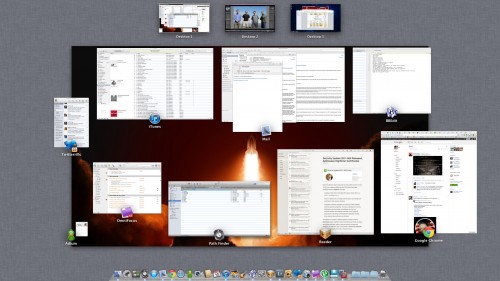
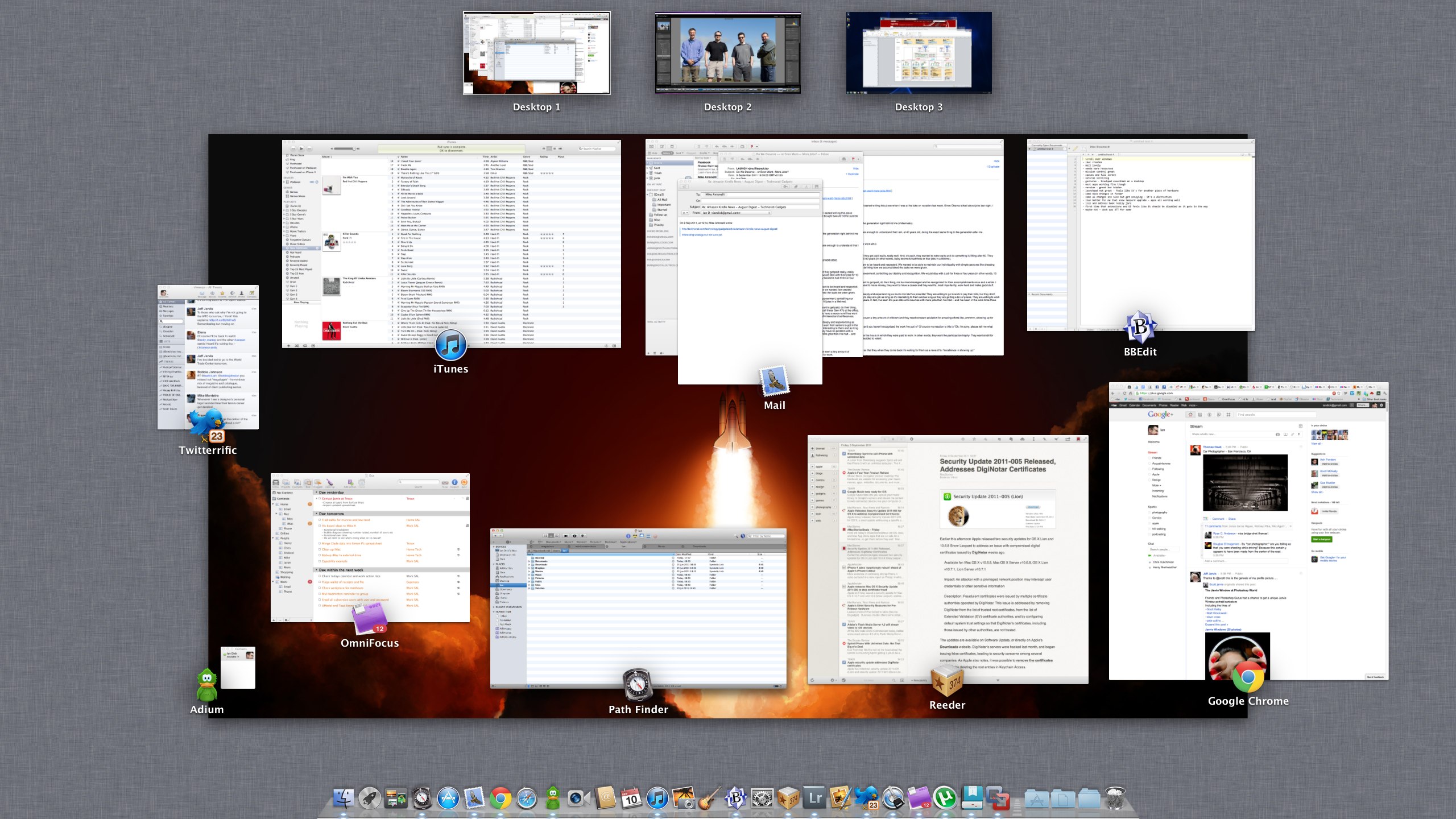
One of the features I loved in OS X was Exposé. I move the mouse to one of the desktop corners and I’d get a quick overview of all open applications that I could easily switch to. Mission Control expands on that feature to include Spaces and also helps knit a couple of other new features together – Gestures and Full Screen applications. The screenshot above is Mission Control showing a typical day on my Mac. Desktop 1 is my main workspace, Desktop 2 is Lightroom full screen and Desktop 3 is Windows 7 (via VMware Fusion) again running full screen. Mission Control now groups windows from the same app together, so if you’ve a few mails open or a few Chrome sessions it’s easy to identify and swap between them.

Spaces is now integrated into Mission Control so to create a new Desktop, enable Mission Control and drag an app to the top strip to either move the app to an existing Desktop or to create a new Desktop. You can also create a new Desktop by moving your cursor to the top right of the screen within Mission Control. New to spaces – you can now default an app to a certain Desktop. Desktop’s also get their own background but I wish you could rename your Desktop. Not essential but I’d rather see Lightroom or Windows instead of Desktop 2 or Desktop 3.

Overall, I love Mission Control. I’m using Spaces far more effectively and it makes it easy to control your app’s and desktop’s. Shifting an app onto a separate Desktop (or making it full screen) gives you instant focus away from the distractions of e-mail, Twitter and IM. On a 27″ iMac the Full Screen mode feels….overkill. Firstly an application needs to support it and if it does you get a small icon on the right of the app’s toolbar. One click and the app moves to Full Screen, hiding the toolbar and Dock filling the screen fully. For certain app’s it makes sense but for others it’s just too much on the big screen.

On a laptop however, Full Screen makes perfect sense especially on a Macbook Air. Coupled with a three finger swipe to move between Desktop’s and you have a great way of running app’s and switching quickly between them.

Mission Control also meant the return of the Dashboard. I’d disabled it a long time ago as it was unused and felt like a waste of resources. It now gets pride of place in the top row alongside other Spaces and a three swipe to the right from Desktop 1 shows the Dashboard. Mmmmm. I could understand this if there were lot’s of great widgets available but the Dashboard has been stagnating for some time. Look at Apple’s own website and the last new widget was published in Feb 2011. If the Dashboard was important surely you could download and install widgets via the App Store? Thankfully it can still be disabled in Mission Controls preference pane.

I’d mentioned Gestures and Lion really has pushed their use throughout the operating system, so much so that if you have a desktop Mac I’d almost say a Magic Trackpad is essential. When I bought the new iMac instead of a mouse I ordered the trackpad and use it, the keyboard and my Logitech mouse to control Lion. Easy to switch between Desktops, enable Mission Control, show the desktop – love it. Just a shame that the trackpad costs £60.
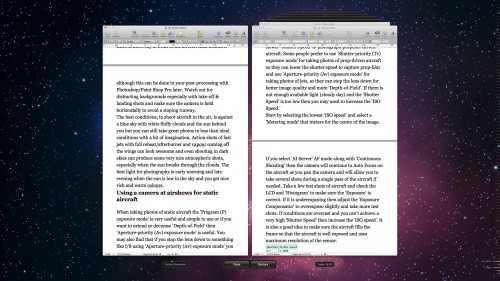
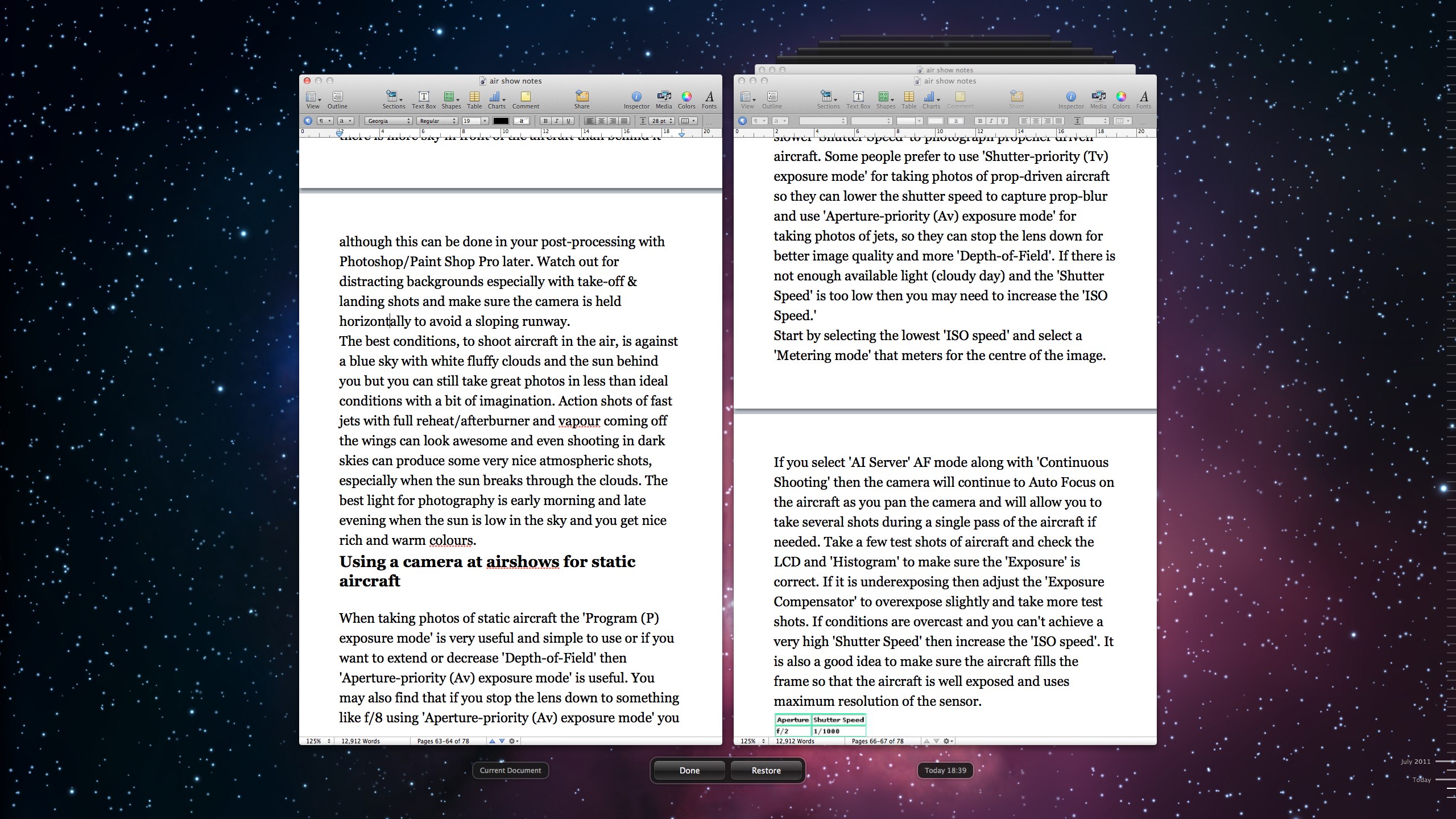
Lion brings some practical improvements that as a whole make for a faster and more secure environment. Resume if supported by an app will launch your applications exactly the same way you left them after a reboot. Sounds simple but makes such a big difference to close an app and when you open it again the toolbars are in the same place and the document you were working on is still open at the same point where you were making changes. Auto Save has been added – you never have to worry about saving again as Lion will auto save your changes as you work. This should hopefully be the end of forgetting to save or losing work if your Mac crashes. Yes, Mac’s crash as I’ll explain later! Coupled with these feature’s is Versions. Click on the title bar of an app and you can browse all versions of the current document. If you select browse you are taken to the familiar Time Machine interface and you browse through the different versions of the dock. You can see changes and easily restore to a previous version. A bit over the top, but then they are making backup and versioning interesting via the animation.

The animations aren’t restricted to just Versions. Throughout Lion you see animations especially in Finder in Mail that on first or second run are fine….the 50th time you see it starts to grate though and frankly gets in the way. One way to disable these is to download Lion Tweaks. This free tool lets you tweak some of Lion’s features – some more annoying than others. Anyway, this is the Likes of Lion so let’s crack on.
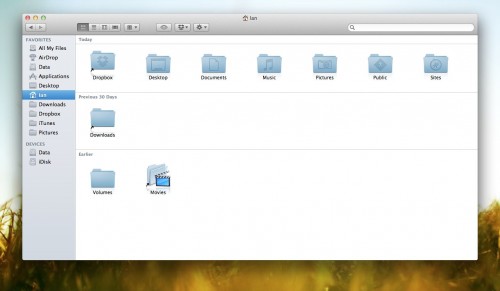
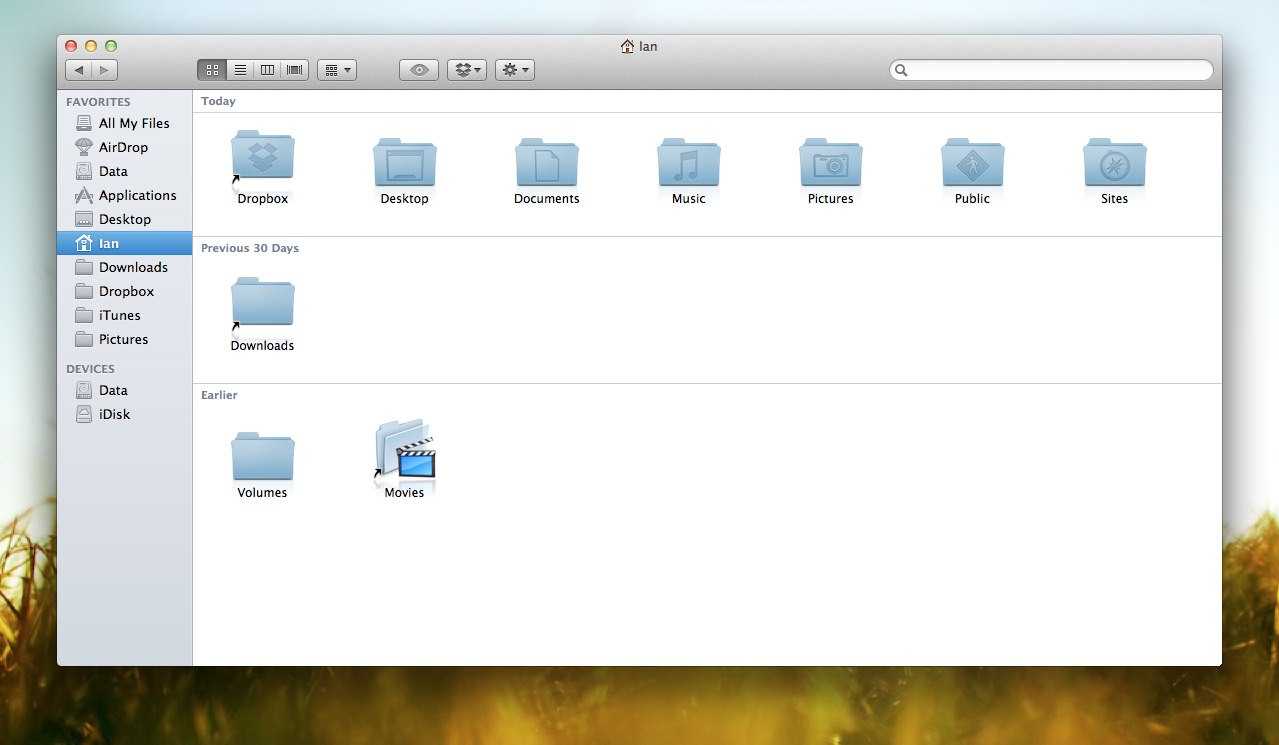
Finder has seen some small upgrades. All My Files groups your files from anywhere on your drives and displays them in the one Finder window allowing you to sort by date, name, application. A small step in making the Finder easier to understand and use. You can now navigate files using gestures and sort tokens have been added to make for a far stronger search. What’s probably the most noticeable change is the colour changes made to the sidebar. More accurately the removal of colour. I like it but many don’t but it should be no surprise as iTunes made the same change recently and the trend is continuing. The latest Evernote update moved to monochrome as did Google Docs. Nice.

Dislikes
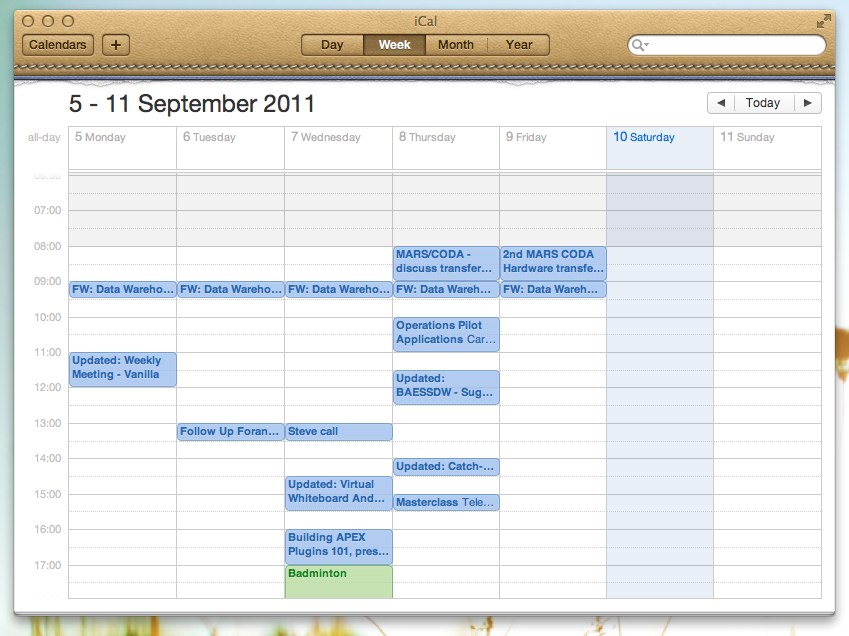
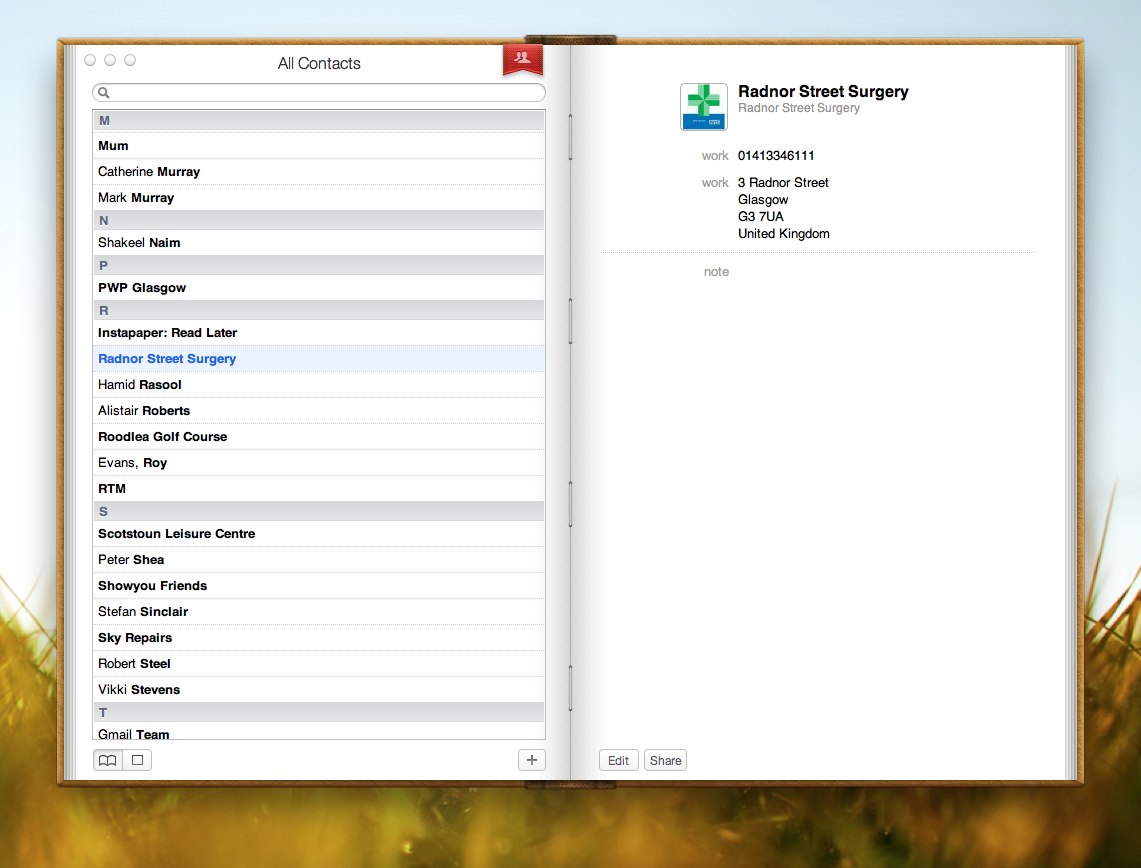
Thats the end of the lovefest though. There are a couple of jarring features in Lion. One of the most annoying is the UI changes to iCal and Address Book. iCal has a couple of nice feature changes but it’s the UI that I find really distracting.
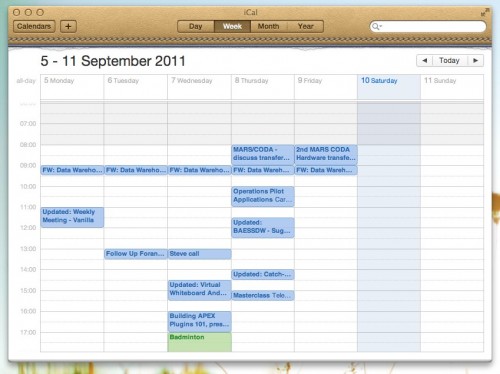
In total contrast to the move to monochrome, iCal now has a faux leather toolbar and a tear off graphic added underneath. The toolbar is ugly. The tear off meaningless – with a gesture can I tear off a page in the calendar? Of course not. It just stands out like a sore thumb…or it would do it if wasn’t for Address Book.
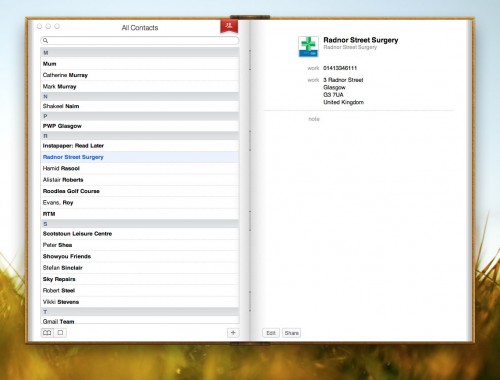
At least iCal has improved it’s functional use with year view and a decent day view. Address Book looks ugly and is more difficult to use than it’s Snow Leopard predecessor. It’s been made to look like a real book…but doesn’t act like one either using the mouse or via gestures. It’s got a horrible graphic at the top acting as a marker…which does nothing. I don’t even think it’s syncing has improved to Google/Yahoo. Disappointing.

Another annoyance is a feature that I used in Snow Leopard has been dropped. I used to love moving the cursor over a window that wasn’t the frontmost selected window and scrolling through the content without bringing the window to the fore. Very handy when scrolling webpages, documents….and Twitter of course. Well, that feature has gone. Why? No idea. See update below – feature is there after all.

Thankfully my biggest fault with Lion was fixed when the first update was released. As mentioned I had a new iMac and there was a horrible bug in Lion that caused the machine to freeze (requiring a switch off and on again) when playing a video after a sleep. Amazed that one got through testing and was part of the final release and it took around 3 weeks before a fix was issued. Years of having bulletproof stability gone in one fell swoop. Since the update though it’s been 100% reliable.
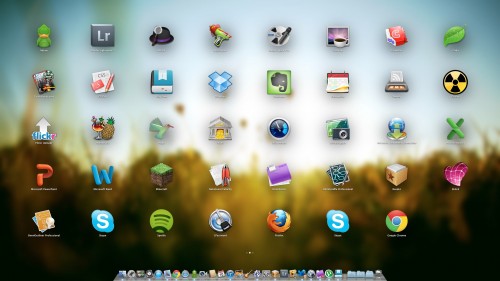
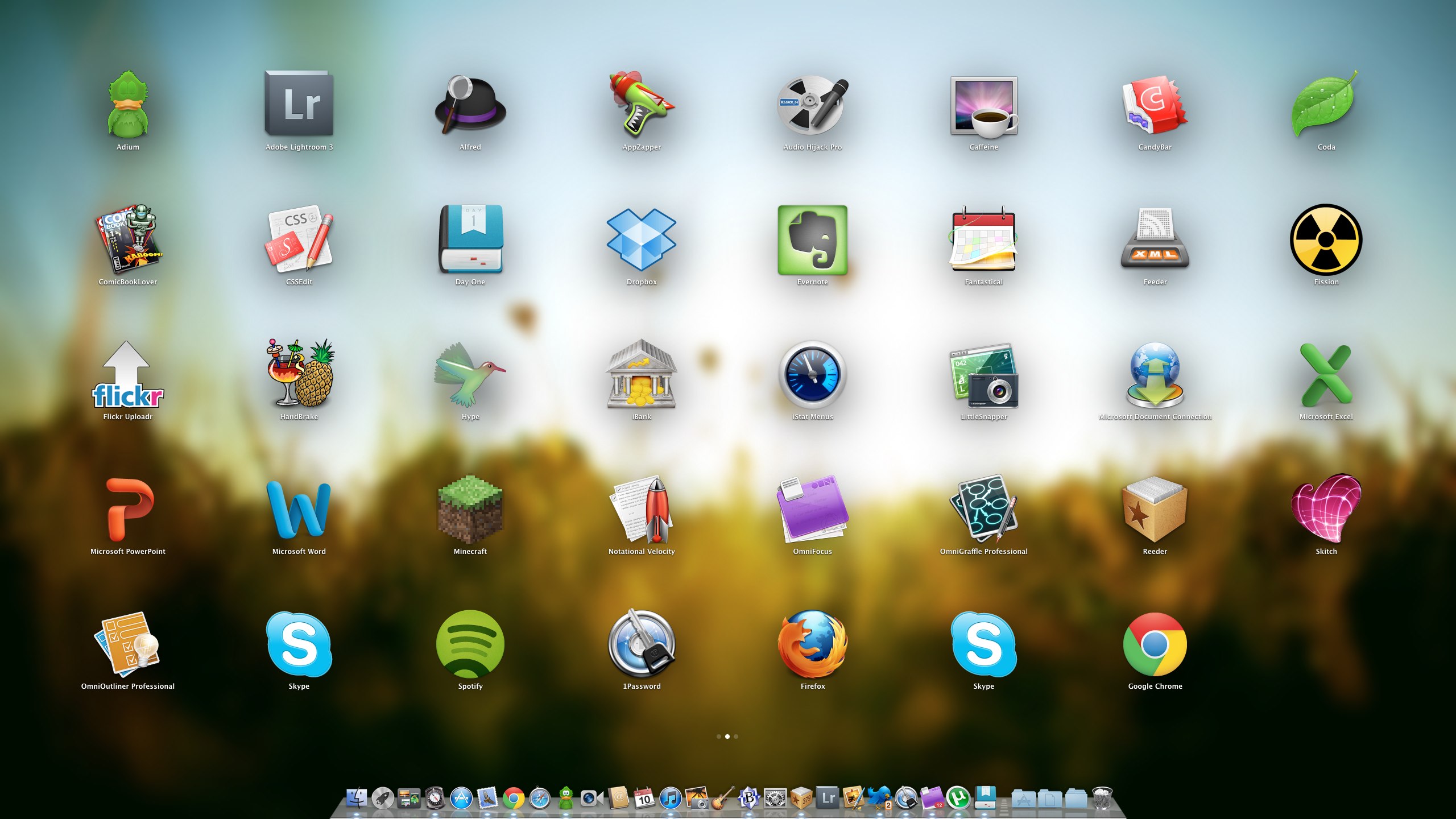
My final groan goes to LaunchPad. This groups applications together and displays them in a view similar to iOS devices. You can create folders by dragging one app over another just like in iOS. When you download an app from the App Store it also animates to install in LaunchPad. But is it any use? Common app’s will launch from the dock and most folk will use Spotlight, an app launcher like Alfred or Launchbar or just navigate to the app’s folder. It feels like an app for a touch screen Mac, not the current gesture driven devices we currently use. Maybe it’s a sign of technologies to come but it doesn’t really fit in Mac OS X. At a push I could see it as useful when launching app’s on my TV connected Mini, but thats a stretch. I also hate that applications from the App Store are installed to LaunchPad and that it pops up on the screen. Only slightly better than installing to the dock but not by much.

One More Thing
Natural Scrolling also known as ‘lets reverse scrolling as you know it and mess with your head’. Basically, current scrolling on Mac and Windows moves the scrollbar – push up, the scrollbar moves up and you move up the page. Natural Scrolling reverses this. Push up to move the page up (not the scrollbar which is often hidden in Lion) and hence move down the screen, exactly as you do on any iOS device. It is optional so you can change the default to work as it did before but I’ve stuck with it and the brain is retrained. I even altered my work Windows setup to do the same. It’s no big deal really although it garnered a lot of press and my gut feel is that it’s been switched for a reason, so why not stick with it?

Closing Thoughts
So that’s Lion. It’s cheap and easy to install but overall this has been the Mac OS X update with least impact for me. Some of the changes are minimal and in some ways a step back. One aspect that has been good is third party app’s have been super stable for me in Lion. Leopard and Snow Leopard upgrades caused me some pain especially with the podcast but I’ve had very little issue with Lion. I’d still say it’s worthwhile upgrading, but if you haven’t already I’d wait now for 10.7.2 which may bring you a little iCloud goodness as well as improved stability. You also really do need a trackpad to take best advantage of Lion – fine for laptop owners but a potential upgrade cost that’s hidden to desktop users. It will be interesting to see how Lion compares with Windows 8 which I have running via VMware so thoughts on that soon.

Update 24/09/2011
A couple of quick updates to the post. Firstly, you can scroll in background windows without selecting them first. I’m sure that wasn’t there when I first installed Lion so maybe the 10.7.1 update enabled it? Not sure. Secondly is another customisation tool for Lion that is free – Deeper from Titanium Software. It has lots of options to change the look and feel of Lion and many of the default apps. Addictive Tips has a great review of Deeper which highlights the many customisation options.
First Run

I’ve had an itch for quite a while. An itch to run. Folk that know me will know I’m not built for running. Always been big and not got a great engine so running is a bit of a challenge. After the hill walks my legs take days to recover and going back to school days, sprints were fine but cross country was awful. Despite all that, I still wanted to give it ago.

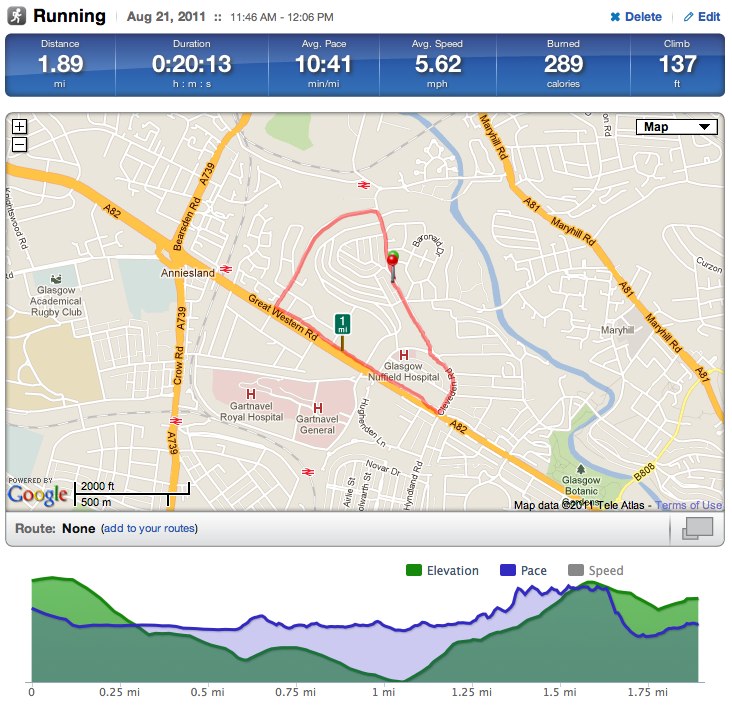
I kept putting it off. I was scared…of failure, of running in public. Daft but when you’ve got something like that in your head it can be hard to shake. However, if I want to run a 10k at some point I have to start somewhere so today was the day. Looking at Google maps I planned a straightforward door to door run which would take over 3km. The results are below and in more detail at RunKeeper.

Main snag is that I live on the top of a small hill so whatever I do it will involve a hill of sorts. Kept the pace slow and it was going ok until the incline up Gt Western Road and the climb up Cleveden. I could feel a bit of stich coming on so had to stop. I walked up the hill and ran the last 200 metres. So overall not too bad.

However my legs did feel pretty sore afterwards despite the hill walking, cycling and badminton I do. The impact from running on the road is not to be ignored. The good news though is that I enjoyed the run so the current plan is to do the same route midweek and if that goes well (and assuming my legs feel good tomorrow) then I’ll pay a visit to Achilles Heel and sort out a more appropriate pair of running shoes that will help with the impact on the roads. I may also look into running offroad to help with the impact but baby steps for the moment.

Reason for doing this is twofold. I want to build up a bit more stamina and endurance and also help with the recovery after the hill walks. Secondly, it’s something different and it gets me outside and off the bike (which will still continue). Third (I did say two but who’s counting) is the inkling to run a 10k, maybe before the end of the year. Depends on lot’s of things but it’s good to have a goal when starting these things.

So more posts hopefully soon, even if it is to say my legs are buggered and I can’t go on! One final thing – it’s nice to be using RunKeeper for, you know, running!

RIAT 2011

A few weeks ago I went to my first air show – RIAT 2011. I’d always wanted to attend an air show but never really had the opportunity. What was nice about RIAT was that there was a group of us going (Shak, Tam and Ro), we were all going with a load of photography gear and the tickets worked out a bit cheaper as BAE Systems was a sponsor. What this meant was £10 off the ticket price, free lunch (which was actually pretty good) and use of a BAE Systems marquee…oh, and a free program.

For the weekend I hired a lens to try and take better advantage of the air show. My current lens doesn’t have the reach and while the lens hire cots just under £100, then lens I hired would costs nearer £1300 to buy so it was a bit of ano brainer. What was most disappointing though was the weather. We arrived at RAF Fairford for 07:45 and 5 mins standing in a queue was enough to drench our jeans. We all had waterproof jackets but it was still a poor start. We headed straight for the BAE marquee…which became our home for the next 4 1/2 hours as the rain just wouldn’t stop. The show should have started at 10:00 but instead it was nearer 12:30 before an Apache took to the skies. Unfortunately this meant that some of the aircraft didn’t fly on the Saturday. More annoyingly, the presenter kept telling us over the tannoy about how good the aircraft that wasn’t flying was in practice the day before. Shut up!

However I loved the show. It was great seeing the Apache, The Red Arrows, Eurofighter and the Chinook. I loved the Mustang and Spitfire as well. What I didn’t love was how difficult it was to photograph some of the planes. This was due to a number of issues. Firstly, jets move quickly. Obvious I know but keeping a jet in frame as I snapped was tricky. It was also tricky to keep it in frame and in focus. So many photo’s I took just weren’t very sharp. My biggest issue (apart from lack of skill) was the weather. Initially dark and gloomy, it then changed to dark at one side of the airfield to brighter at the other end. It then changed again to dark at one end and bright blue sky at the other, before ending the day in lovely sunshine. Tricky.

That didn’t stop me trying and by the end of the day I had taken just over 1200 photo’s. After ditching many and cleaning up others in Lightroom I finally got round to publishing 200 photo’s from RIAt on Flickr, handily split into sets.

Helicopters
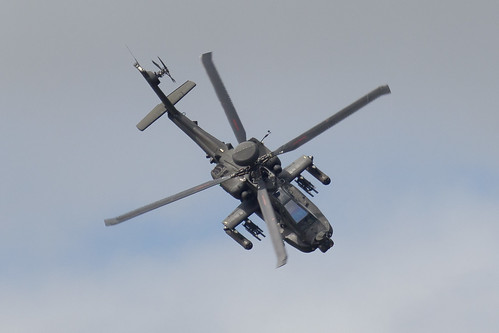
Probably the aircraft I most wanted to see – the Apache. I’ve loved this since I was a kid, having a large airfix dangling from the ceiling. I couldn’t believe how manoeuvrable it was at the show. It managed a barrell roll. In a helicopter. Awesome.

Apache

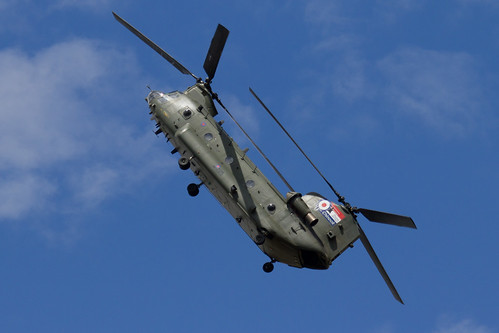
Also impressive was the Chinook. A massive beast but it was being thrown around the show as if it was a toy.

Chinook

Full helicopter set can be found on Flickr.

Jets
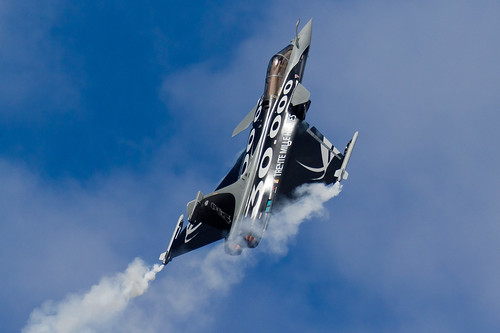
Some amazing displays but the one that stood out was the Rafale. A great 10 minute display with the pilot really pulling out a great show.

French Dassault Rafale B

Also impressive was the EuroFighter but it didn’t do too much at the show apart from look and sound good! Full set can be found on Flickr.

Display
Some great display teams at RIAT with the Red Arrows coming out on top.

The Red Arrows

However special mention goes to the Italian Frecce Tricolori display team. Great colour and variety during there display but lifted by the great commentator. You had to be there to understand why but it did make us all laugh.

Italian Frecce Tricolori

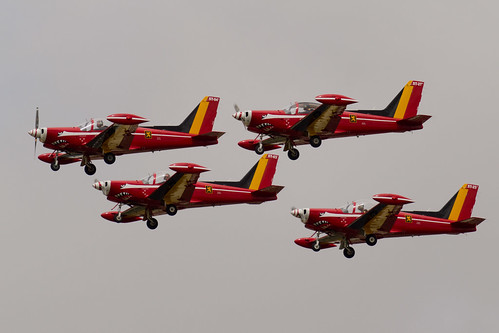
My favourite picture from the displays though was the Belgian display team – Les Diables Rouge.

Les Diables Rouge

It’s not the planes but the pilots. A mixture of concentration and one of them glancing over to the crowd. Love it. Click through to the full display set on Flickr.

Classics
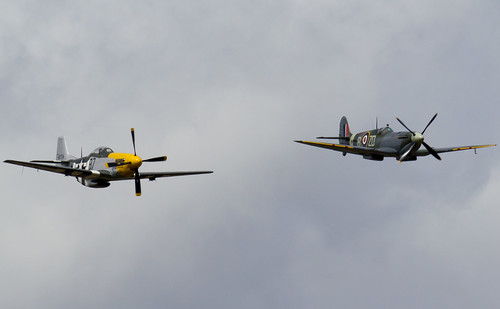
A few great old planes on display and I was pretty stunned that when the Vulcan had landed around half of the crowd left – there was still around 2 hours of flying! I guess there’s a lot of love out there for the Vulcan that I didn’t appreciate. Favourite for me though was the Spitfire, seen here with a Mustang.

RAF Spitfire and American P-51 Mustang

The sound it made was great – can’t imagine how hundreds of Spitfires taking off in WWII must have sounded. Full set of classics can be found here on Flickr.

Round Up
So a great day and weekend which wasn’t spoiled by me and Shak being sick – pair of lightweights. Thanks to Tam for putting us up (and putting up with us) and also Lynne for the great cooking. Pleased to have seen so many great planes but don’t think I’ve caught the airshow bug. One was enough…for now.

Beinn Bhuidhe

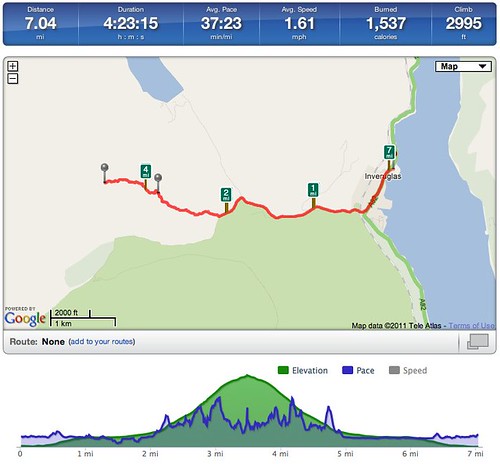
The final, for me anyway, Arrochar Alp was Beinn Bhuidhe and yesterday seemed to be a fine day to tackle this munro. It was rated more difficult and required a four mile walk before beginning the climb but for me this was probably my hardest walk.

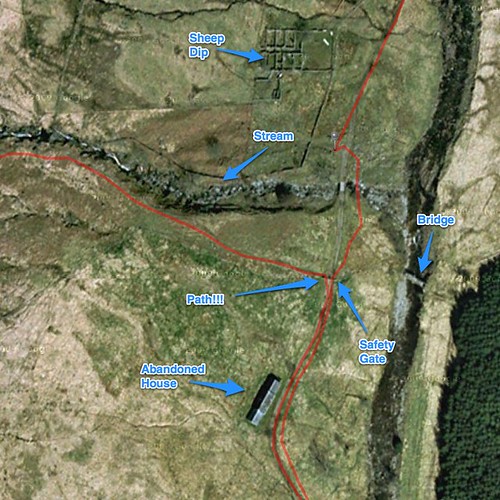
We started early from the head of Loch Fyne on our 4 mile walk. First mistake of the day was heading through the quarry. Think of the Doctor Who episodes from the 70’s and 80’s which were all set in quarries and you’ll get the idea – not exactly picturesque. We cracked on and it was pertty warm/muggy even though it was only 09:00. After 4 or so miles we were starting to wonder where the path was for Beinn Bhuidhe. We kept walking until we got to a sheep dip on the map, thinking that maybe this was the route up? After 10 mins of discussion we cracked on until we had walked 5 miles – we were then convinced we had missed the path but never mind – lets crack on up the hill and we’ll find it soon enough.

Beinn Bhuidhe Route Guidance

In case you’ve stumbled on this website looking for advice look at the map above. The path is halfway between the abandoned house and the stream, directly on your left after you pass through the safety gate. In winter/spring it might be obvious but at this time of year almost impossible to spot. We bumped into a couple of groups later on who had made the same mistake which made us feel a whole load better…one day we will learn.

Anyway, back to cracking on up the hill. We skirted around a small woodland and walked up some steep undergrowth – thick grass and bracken. It was warm and unpleasant and the midges were out in full force. Nice. This was much the same for a lot of the walk. We also got split up and were walking as individuals for much of the first 2/3rds of the walk. Around 600m I had to stop. Was feeling very ropey, sweating buckets and convinced I was going to be sick. Was also thinking Danny had dropped back quite a bit so I may as well wait. 5 minutes later and I was sick. First time on a hill walk that I’ve been that unwell. A few mins later and despite being that far up I was convinced that I should turn back. A couple of mins later I spotted Danny ahead of me – he had taken a slightly different route and was now looking for his lost sunglasses. A quick shout and he buddied up with me for the rest of the walk and I carried on. Big thanks to him – he will now be known as sherpa Dan.

View from Beinn Bhuidhe

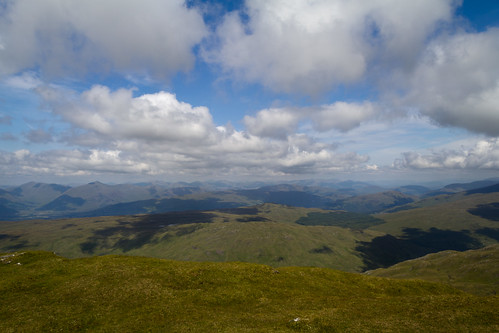
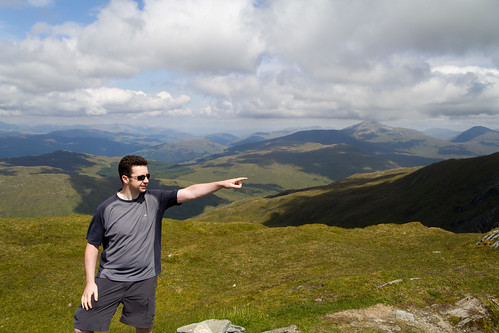
The walk up was great after 800m. Some ridge walking and we also found a path! Finally! The views from the top were stunning. Photo’s really don’t do it justice – it was some of the best views from a munro yet. After a quick lunch (half lunch for me as I still felt ropey) we cracked on down following the path this time.

Squirrel

The path from around 500m follows the stream all the way down to the starting point and was steep and pretty awkward in places requiring a wee bit of scrambling and searching for hand holds. In some ways it felt no easier than the route we eventually took although with hindsight it was more straightforward. I’m sure taking the path is also more scenic as there are a few waterfalls to see on the route up. We couldn’t believe how obscure the path was when we reached the start point – no wonder we missed it!

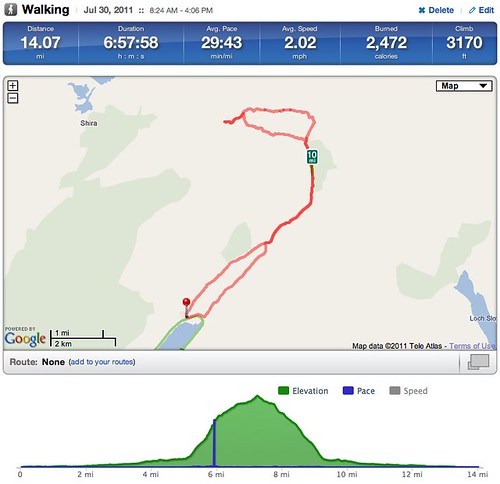
Beinn Bhuidhe Runkeeper

We walked back to the car, this time avoiding the quarry which was a far better option. We also indulged on some ice cream at the car park. I’m sure Bounty ice cream isn’t recommended for an upset stomach but it helped me! As usual, full photo set is on Flickr but not as many as usual – didn’t feel up to it really which is a shame as some of the ridge views were great.

So a tough walk especially on a warm muggy day but the views are stunning. For me, that was the last Arrochar Alp and was actually the most rewarding after The Cobbler despite the heat, sickness, my burnt neck and arms or the extra midge bites I picked up. Well worth doing but start early and if you’ve got the option, take a bike and cycle the first three miles. Your legs will thank you later.

Decision made

Cars. Not really my favourite subject. For whatever reason I’ve just never really got the bug. I love my gadgets and tech toys and I guess thankfully for my bank account, that love has never transferred to cars. Maybe it’s the fact that it sits in the street devaluing daily and at some point after buying a car some git will hit it with a door, or scratch it lightly as they pass by in a car park. Odd viewpoint I know, but it’s not changed in 14 years of driving and owning cars.

However, I did need to replace my Focus. It was 9 years old, I’d fell out of love with it a while ago and in my head I had to replace it. This wasn’t helped by a few fresh scratches from work recently that I hadn’t bothered fixing and a couple of bad pothole problems this year. Yes I would have got that no matter what car I had, but it still lead me to replacing sooner rather than later. But replace with what?

I set a budget and also decided that I would’t be buying new again. The Focus was my first new car and although it was great to get brand new and it felt like mine from day one, the amount I lost on just driving the car of the forecourt isn’t an experience I’d like to repeat…until the lottery win happens. Which it will. One day. Maybe. Onto the more tricky decision – what car to get? I picked up a few magazines, looked through hundreds of options, toured a few garages, test drove a couple of cars and ended up with…

Civic

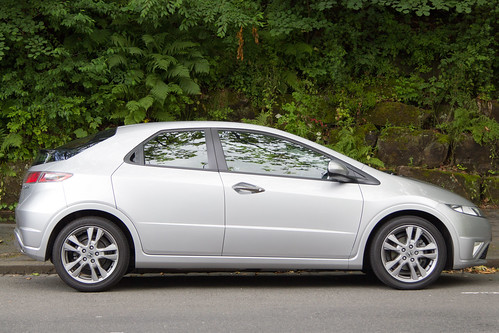
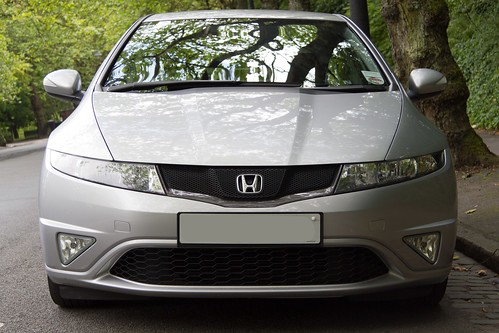
A Honda Civic. It’s just over a year old so still has 20 months left on it’s warranty and it’s a 1.8 SI petrol edition. I love the interior – the dash is colourful and clear and there’s lots of nice little features inside that tick the boxes for me. It’s comfortable to drive and has plenty power to keep me happy. I also like the exterior styling – I know it’s not to everyone’s taste which is similar to the Focus in that amongst my friends they either loved it or hated it. Obviously I love it!

Civic

I bought the car from a garage in Edinburgh so the first actual drive back was interesting – torrential rain and the joys of the M8 but it was a pleasure compared to the Focus on the way through, but then it should be given the age difference. The ride is slightly harder than the Focus but the steering is more direct. There’s also some gamifaction on the dashboard – an eco rating to tell you how you are driving and when to change gears to optimise fuel usage.

Overall I’m delighted with it although I have only had it a few days now. Hopefully it lasts as well as the Focus did. One last geeky point that I like – it has a USB port and I can plug in the iPhone, and control navigation of the iPhone from the steering wheel. It’s the small things. Bliss.

Ben Vane

A couple of months since the last walk but the weather was too good to ignore. This time it was to tackle Ben Vane, another one of the local munro’s. Setting off early on a glorious day we were surprised how quiet it was for a mid summers day.

Ben Vane

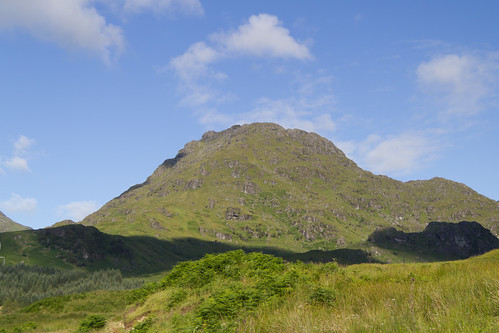
We were quickly rewarded with some great views back over Loch Lomond. It then turned quite boggy – wish I’d worn my gators as the boots were caked in mud on the way up and down. The boggy ground only lasted for 15-20 mins though and the rest of the way was on ok but steep paths. There’s plenty of false summits and also some scrambling near the top but it was worth it.

Ben Lomond from Ben Vane

For a summers day when temperatures at ground level were nearly 20C, it was a wee bit chilly at the top with temps nearer 5 or 6C. Still, it was nice to cool off, grab lunch and take in the views which were stunning. Usually in summer you get a lot more haze but not today.

Alistair, Danny, Ian and Allan on Ben Vane

A very helpful fellow walker took the above photo. More telling is that while the camera was in her hands it seemed to perform so much better. I need to spend time revisiting many of the 550D’s features!

Ben Vane Runkeeper

Considering the stops and the 30 mins for lunch we made really good time on Saturday. Even on the way back down I was surprised by the lack of fellow walkers. Also surprising is the impact on my thighs this week – it’s 5 days since the walk and they are still a bit tender. I must look into improving strength/recovery as it seems to impact me more than others. As usual, all photo’s can be found on Flickr and also Facebook and Google+. Trying other ways of getting photo’s out to friends as not everyone likes or uses Flickr.

So that’s five out of the six munro’s that make up the Arrochar Alps ticked off, leaving just Beinn Bhuidhe which will hopefully be this weekend as the weather is looking good if not a tad hotter. Early start required.

88.8

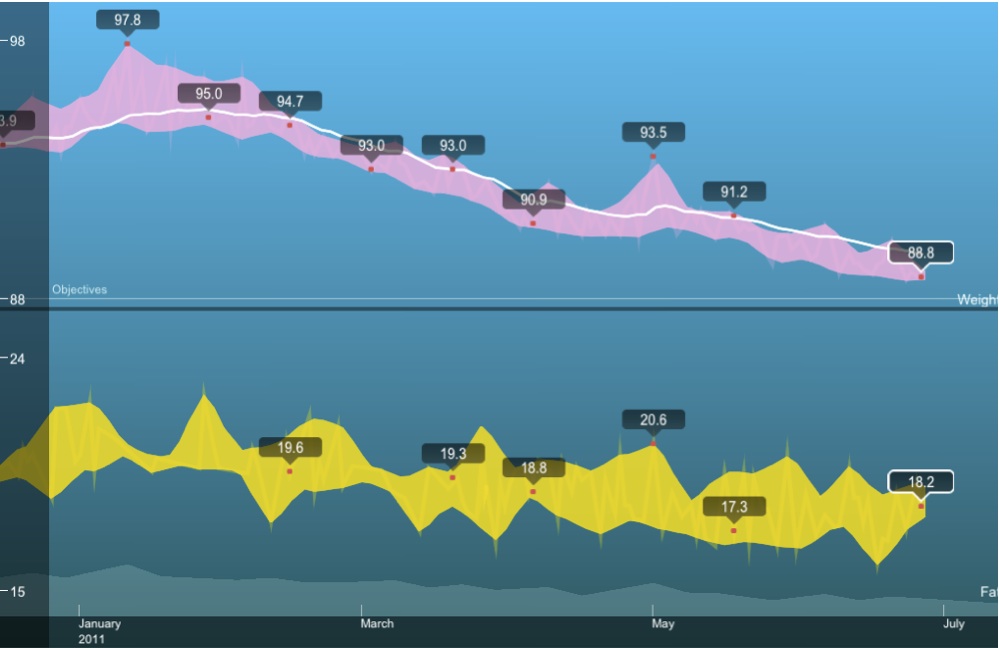
88.8. A nice number but why is it blog worthy? For almost 4 years I’ve been trying to lose weight. The first 18 to 20 months saw my weight drop from almost 130kg down to 93kg. In 2010 my weight drifted slightly upwards and by the start of this year I was hovering around 97kg. I made a statement at the start of the year to take 5kg off this year but thanks to the Fitbit, doing a bit more on the bike and having some healthy competition with friends on RunKeeper I’ve shaved off more then 5. This morning I weighed 88.8kg.

So what you might say? Well convert that weight to stones and for the first time in probably 15 years I weigh less than 14 stones. Get in!!!! I’m pretty chuffed at getting to 13 stone something, even if the something is 13.8 pounds.

Still some way to go if I want my BMI to get below 25 and not be overweight. Current BMI is 27.3 and I need to lose another 18 lbs or in modern money a further 8.2kg. I think that will be a big ask although current weight loss would see me hit that weight at year end…but it’s getting harder and tougher to lose.

Small steady steps but overall that’s 6 and 1/2 stones in nearly 4 years. Happy days.

New Toys

It’s 4 years and 8 months since I bought an iMac and moved to Apple. The 24″ model has done me proud over that time but I’ve been wanting to upgrade for a few months now. The latest upgrades saw me finally pushing the button. So what did I order?

The works basically. A 27″ iMac will be winging it’s way to me shortly with an SSD, i7 CPU, fast graphics card and instead of a mouse (Logitech wins over Apple every time) I’ve went for a trackpad as with Lion coming soon I can see gesture support being heavily used throughout the OS and third party app’s over the coming year. I really can’t wait to see just how fast this thing is. The SSD will make a massive difference but that quad core CPU should chew through tasks. The only thing I didn’t upgrade was the RAM. Comes with 4GB, but Apple want £120 for another 4 – I can buy 16GB of Crucial RAM for the same price.

There’s only one snag. Ordered almost two weeks ago but the delivery date is still over 4 weeks away – June 24th. I hate waiting especially as Apple have grabbed the cash already. Grrrr. Still, nice toys on the way so can’t complain. Interestingly when I check on the status today the Apple page say’s come back tomorrow for more functionality – linked to rumours of Apple store updates on May 22nd?

Only downside to new toys is getting rid of the old iMac. Will probably sell on eBay but I never really like the eBay experience for a variety of reasons. It’s still worth a few hundred pounds though so needs must.
Another new toy soon – a car. No idea what I’m buying or when apart from ‘soon’. Need to consult with my friendly car geeks as I’m useless when it comes to cars. Looking forward to it though – the Focus is coming up for 10 years old. Showing it’s age and I’m getting bored with it.

Beinn Ime

In August last year I tried to walk up Beinn Ime via Beinn Luibhean but admitted defeat due to the wind. Roll forward 6 months and it was time to finally climb Ime. We set off early on Friday (cheers to Wills and Kate as we had the day off) and started from Succouth this time which meant walking between The Cobbler and Beinn Narnain before finally getting to Beinn Ime.

Beinn Ime

The weather was glorious although quite breezy at ground level and the forecast higher up was winds touching gales in places and to be a lot colder than the 16-18C at the car park. The first 3 miles was a gradual ascent on a well crafted path that took us to the back of the Cobbler. We then veered right and started climbing Ime. The ground at this point was quite boggy and to be honest there was no well defined path, probably because Ime isn’t as popular as the other two peaks in the vicinity.

After 20-30 mins we picked up on a path as the climb became more strenuous. This took us up the majority of Beinn Ime. At this point the wind really picked up and it was pretty cold. Until now it had been shorts and t-shirt weather but a warmer top was required to get us up the final peaks.

View from Beinn Ime

There were great views from the top but the sun started to hide between clouds and it became pretty hazy in places. At this point it was bloody cold – despite the great ground temp’s we were glad of hat s and gloves and some shelter behind a rock so we could grab some lunch. We didn’t hang around at the summit – just too cold but coming down off the main peak there was a great photo opportunity and the sun had popped out again – still really windy though.

Ian on Beinn Ime

In the background to the photo above you can see the seaplane that takes off from Loch Lomond and the Clyde. I’ll need to try that one day when the weather is good – the views from it will be amazing. After taking some shots we made our way back down – we really covered ground pretty quickly on Friday as can be seen from the RunKeeper stats below.

Beinn Ime Runkeeper

Even better – no midges to report which was a surprise. I just need to remember that my legs need sun tan lotion or they burn. Not clever. Next up is probably Ben Vane which leaves the more isolated Beinn Bhuidhe to complete the five munro’s that make up the Arrochar Alp’s. Hopefully we’ll get them both done by the middle of summer.

As usual, full set of Flickr photo’s can be found here.

Fitbit

I’ve cast envious eye’s on a Fitbit for around a year now. Since it was first announced and got traction amongst many bloggers and podcasters I’ve wanted one. The only snag is that despite saying it would be coming to the UK soon, it never has. In January I decided enough was enough and I’d import one. That quickly turned to three as a couple of friends were also interested. Thanks to another friend, Lewis, he kindly picked three up on a business trip to the states and since the beginning of February I’ve been using one constantly.

So – what is a Fitbit?
At first glance it’s a posh pedometer. It tracks your steps, can track activity during the day and at night will also track your sleep. However the hardware is secondary to the online logging and analytics service. I’ll describe more on that later. First up, lets talk about what you get in the box for $99. The Fitbit device itself is basically a large clip with one button. Clip it onto your belt, trousers or just place it in your pocket (woman are advised to clip it on their bra – doesn’t sound right but there you go). If you click on the button then four different stats are displayed on the OLED screen, which is a rather lovely blue. The stats are number of steps walked, number of calories burned, miles walked and then finally a flower. All the stats run from midnight to midnight.

Also in the box is a USB charge/sync unit for your PC or Mac, a holder to allow you to attached the Fitbit to thicker belts or straps and a wrist band that you attach the Fitbit to while sleeping. First impressions are of a well made piece of kit that is durable and I just adore the screen. The flower mentioned above is a graphical representation of your activity level over the last few hours. Sit at your desk for a morning and you’ll see a a short stem and flower. Do some exercise for an hour and you’ll see a longer stem and some leaves representing your activity. I’ve only ever seen up to 10 leaves but seemingly it can go to 12. Thats a target to aim for.

Sleep tracking is pretty easy. Attached the Fitbit to your wrist strap then hold down the button until you see START. Then sleep. In the morning hold the button down again until you see STOP. Fitbit will know when it syncs that this was a sleep period and will track hours slept and also the number of times you were awake. Thankfully it’s easy to add sleeps manually as I do forget to press the button from time to time.

Fitbit Crack

Now that I’ve had the Fitbit for three months I’m a bit concerned about the durability of the Fitbit tracker. I can’t recall any time that I’ve dropped or put any undue pressure on the Fitbit but during that time it’s developed a crack in the underside plastic. It’s not affected the performance of the Fitbit but I do wonder what condition it will be in a few months from now. It’s also picked up a couple of scratches in the softish rubber that the outside is coated in. If it was only mine cracked I put it down to a clumsy incident but Brian who picked up one at the same time as me also has a crack in the same place. I’ll contact Fitbit support to see if this is a known flaw or just coincidence.

On the other hand, Chris has managed to wash his Fitbit tracker and it survived to live another day. He’s not sure that the screen is as clear as it once was but just pleased that it survived the ordeal.

Syncing
To sync the Fitbit you need to install the tracker software on your Mac or PC, plug in the USB charge/sync unit, create an account on the Fitbit site and then place the tracker on the charger. The tracker is then authenticated to your Fitbit online account and your good to go. Charging doesn’t take too long and a full charge lasts me around a week. The tracker also holds a lot of data – up to 7 full day’s worth of data and in total up to 30 days but not in the same detail as the last 7 days. Handy if your travelling and not able to sync although now that I’ve used it for a few months I’d be making sure that I could sync every few days if I was on holiday. Yes, I’m an addict!

Syncing is quick but I’ve had a couple of problems getting syncing to work and still have to resort to a workaround to get sleep’s sync’d properly. On first getting the Fitbit I plugged it into my main computer, a 4 year old iMac. No matter what I did I couldn’t get the Mac to see the Fitbit when placed on the sync unit. Visited the Forums and help pages and couldn’t get it to work. I was also a bit concerned at some of the advice given to get it working. Opening terminal, typing in unix commands to capture output from the Fitbit. Nasty. This is supposed to be a wear and forget type device. How many people are really comfortable visiting terminal, capturing verbose output and deciphering whats wrong?

Luckily I had a Mac Mini in the house – plugged the sync unit into the Mini and the Fitbit worked first time. Another issue I had was that the firmware version that shipped with my Fitbit has a bug that means if activity is logged before syncing a sleep, then the sleep isn’t captured. As I’ve mentioned already, sleeps can be manually added but that’s a pain that I want to avoid. However the instructions for updating the firmware (on Mac at least) are pretty nasty:

For Mac users:
1. Downgrade the Mac client by going to http://cache.fitbit.com/uploader/Fitbit-Uploader-for-Mac-1.0.2.dmg
2. Install client version 1.0.2
3. Close the Fitbit Tracker Set-up page
4. Update the firmware

a. Open a Finder window.
b. Navigate to Applications > Utilities.
c. Double-click on the Terminal application to open it. A terminal window appears.
d. Now enter: FB_OPEN_MODE=”userFirmwareUpdate” /Applications/Fitbit.app/Contents/MacOS/Fitbit
e. The Fitbit application will launch and upgrade your firmware
f. Do not close the terminal window until after you have quit the Fitbit application.

5. Unplug the base station
6. Upgrade the Mac client by going to http://d290v5wu4xgrh.cloudfront.net/scratch/Install-Fitbit-1.8.2-2011-01-27.dmg
7. Install client version 1.8.2

After the update, reset the Fitbit. Place it on the base station then press the button on the bottom of the base station using a toothpick, pen tip, or paper clip.

Worse – that comes from a user and not the Fitbit staff. I followed the instructions but couldn’t get the firmware to update so my solution is to put the Fitbit on the sync unit when I wake in the morning. Gets the sleeps updated correctly but that 10-15 mins on the sync unit each day keeps the charge topped up. Hopefully at some point there will be a far easier way to reliably update the firmware.

Fitbit Website
The Fitbit website is the real core of this service. The website is free, in fact you can sign up for an account without having a Fitbit tracker. Fitbit will estimate your daily burn based on age, sex, weight etc and you can manually track activities, food and sleep but it’s obviously far more effective if you have the tracker.

Once you login you have four main tabs – Home, Tracker, Community and Analytics. The first three are available for all while the Analytics tab is a $50 a year subscription service. More on that later. First up is the Home tab. This gives you a daily or historical view of your calories consumed vs calories burned, steps and distance you’ve walked, how active you are, your weight and finally your sleeps. Daily will just show you the current day with the ability to pop up a calendar and select an individual day. Historical will show you the previous 30 days from the date selected in the calendar. It’s a great view showing everything you need to see around your statistics.

To the right of the main statistics are two other important panels that highlight the more social aspects of the site – My Stats and Friends. My Stats, shown above, highlights your individual records. Most steps taken, most calories burned etc. It also compares your stats with others using Fitbit and allows you to filter to show how active you are compared to others of the same sex and/or BMI.

Fitbit also allows you to follow friends and there is an area on the Home tab that shows you a leader board so you can see how your doing compared to friends but also allows you to jump quickly to their profile or see how your compared in a specific area – steps, distance or activity. It shouldn’t be underestimated how seeing friends doing well spurs you on. Gamification of weight loss and being healthy has given me a real kick this year.

The Home tab also lets you quickly log Food, Activity and Weight but really these are shortcuts to the second tab – Tracker.

Tracker
This is where the Fitbit website allows you to add real value to your statistics and results. You can track the following attributes using a very intuitive front end that allows you to quickly add values:

  • Food – Fitbit allows you to track your diet. There’s a built in food database but it is very US centric. However you can add your own food’s and manufacturers so despite there being an initial pain it generally takes me 20 mins at the weekend to capture all my foods for the week. Something I’d like to see is for Fitbit to link to something like MyFitnessPal which has a great food database rather than build it’s own.
  • Activities – track your biking, hiking etc using this section. Captures the date and time and also the calories burnt. Fitbit can estimate your calorie burn or if you are using equipment to track calories you can enter them manually.
  • Weight – capture weight and body fat. Fitbit have added Withings integration so for me the weight automatically updates daily. Another nice touch – you can track physical body changes as well – Neck, Bicep, Forearm, Chest, Waist, Hips, Thigh and Calf. Phew. I don’t track body changes and despite the Withings site also displaying my weight it’s great to see weight changes alongside food intake and activity.
  • Sleep – track the amount you sleep and also the amount of times you wake up.
  • Journal – track mood/energy and if you have an allergy how mild or severe it is. Very useful to compare with sleep and food – I’m not updating this section yet but intend to from now on. There is also a journal entry area. I do my journalling elsewhere but it’s very handy to have the entries alongside all your other stats.
  • Heart – capture heart rate
  • Blood Pressure – track your blood pressure blood pressure
  • Glucose – capture levels in the morning, afternoon and evening.

Quite a list but that’s not all. You can add one custom tracker that allows you to define and then measure something close to you. For me that would be migraines so I track when I have one and the severity – has an interesting correlation with sleep patterns. If you pay for Fitbit Premium then you add an unlimited amount of trackers so I also track the migraine drugs I take as well.
Both the Food and Activity sections have favourite and most logged lists so those foods that you have all the time can be saved as favourites and added by clicking on them, setting the amount and picking the time of day that you ate something. Very easy.

One question that you may have – how accurate is the Fitbit tracker? On the whole I’ve found it to be very accurate but it does depend on the activity. If I look at one of my hill walks, Fitbit will estimate a far greater distance than actually walked. A just under 10 mile walk was estimated as around 16 1/2 by Fitbit. I think it’s assuming a greater stride length than I take on a hill walk, hence the difference in distance. Another walk I was on which was more flat was accurate when compared to the actual distance tracked in RunKeeper.

One nice new feature that Fitbit has recently added – a weekly progress e-mail. Simple but very effective, it shows you the main stats from the week and displays a simple green up or red down arrow next to the stat to show if you’ve improved from the previous week. It’s another way of prompting you to keep up your progress or step up and do a bit more.

Community
I think this is the weakest area on Fitbit. These are the Fitbit forums – where users can post their hints and tips, their suggestions for the future and also seek technical help.

Until recently you couldn’t do much more than view the forum topics and search for a topic. An update in the last month now allows you to follow topics so you can keep track of updates. You can also se forum members, click through to their profiles and add them as friends but it all feels a bit clunky.
You can also create and see other public groups. There are groups which have their own leaderboards and discussion topics but you can’t search them…and there are now over 480 public groups. It feels like Fitbit have rolled out half a feature which needs a bit of polish to finish off.

Sharing and Privacy
Fitbit allows you to share your results easily on Twitter, Facebook and WordPress. There’s an option within your settings that allows you to setup a daily or weekly tweet showing just how good…or bad your doing. This can also be sent to Facebook or WordPress. I send my Fitbit tweets to the same account as my Withings scale – howfatisian. Keeps my normal twitter account from being polluted by weight and health tweets.

One area that is maybe worrying you as you read this review is what about your privacy? Many people won’t feel comfortable with sharing stat’s like weight, food eaten or exercise taken and thankfully Fitbit has given you full control on what is visible to others. As you can see from the screenshot above you can chose to share virtually nothing with others or be fully open with just friends. I’m very impressed with this as there are some things I’m happy to share like weight and exercise but I wouldn’t want to share mood and journal.

Fitbit Premium
For $50 a year you can subscribe to Fitbit premium. Although you can get a free trial for a week I waited until I’d built up a month worth of stats before commencing the trial and I’m glad I did as it made the stats more worthwhile and hence better to gauge it’s value.

Benchmarking allows you to dig into your stats and see how you compare with others on Fitbit. The default display can be seen above but you can change from steps to compare around 20 different statistics across different age groups and weight ranges. Another example is below looking at ‘very active minutes’. Looks like I’m doing pretty well.

The Food report highlights the protein, fat and carb content of the food you’ve consumed in a given week and also what you should be aiming for. Looking at mine it’s less fat and more carbs which is something to aim for in the coming months. It also breaks down intake over the day which again is quite interesting.

The Activity report breaks down your burned calories and the activities that you take part in. The Sleep report compares your sleep totals to your peers. I find this report very interesting – it highlights that I’m not getting enough sleep but to be honest no matter how much I try I find it difficult to sleep more.

The Trainer analyses your current Fitbit statistics and creates a 12 weeks plan that encourages you to gradually increase your excercise over the term. Quite effective but after a couple of weeks it suggested that the plan was too easy for me which indicates that the analysis of my statistics wasn’t as thorough as suggested in the advertising material.

A couple of extra’s are also included in the Premium pack. You can export any of your data to CSV or XLS format – shame this isn’t included when I actually buy a Fitbit. Secondly, in the tracker tab you can setup an unlimited amount of custom trackers which is very handy.

API’s and Mobile
Fitbit have recently launched a set of API’s – more detail can be found on their developer website. So if you want to develop an application around Fitbit or use the data from your Fitbit account elsewhere this is the place to visit. In April Fitbit announced that RunKeeper and About.me amongst others will import user data from Fitbit via the API. Fitbit are also developing mobile app’s, firstly for iOS followed by Android. Until then you can make use of the mobile website that Fitbit have developed.

This allows you to add activities and foods on the go. It’s functional, works on any mobile platform but you really miss the speed of an app and the extra features that an app can deliver when compared to the web.

Final Thoughts
This review is a lot longer than expected but that show’s how much I love Fitbit. The physical hardware for me is just 10% of the overall product and despite the doubts on durability and the setup issues I had, the website features and overall statistics that can be pulled from Fitbit are excellent. Highly recommended but please remember that it’s not available in the UK yet which hopefully will be addressed this year.

Even if all you do is place the Fitbit in your pocket everyday the service will deliver lot’s of long term value. To keep up to date on my progress you can visit my public Fitbit profile here.