Apple comes to Glasgow

08:10 – Myself, Graham and Roy meet-up and head towards the Apple store. The plan was to get a breakfast, get to the store before 9, enjoy the opening and for Roy to buy one of the new iMacs. We walked down and could see around 100 folk queued up already. Looks like it was going to be popular. We strolled around looking for food like desperado’s. Central station came to the rescue. Tasty (but expensive) bacon rolls later we headed back to the queue.

08:35 – Back in the queue we start to look around and notice…geeks. Obviously quite passionate and loyal to the Apple brand but the geek quotient per square yard must have been higher than even Maplins during a new catalogue launch. The most ardent fanboys could be spotted quite easily. The queue had also grown to around 300 odd people with more arriving thick and fast.

08:45 – A cheer goes up as the doors to the store are finally opened. Seemingly they were left closed even during last nights friends and family invite – they had to use the side door – as they wanted the doors to be opened for the first time this morning.

08:53 – All the staff come out to cheer the folk in the queue. The queue cheers back. A nice if slightly cheesy touch. You could see that the staff were pretty pumped up for the opening as were some of the people in the queue who looked visibly excited.

DSC03297.JPG

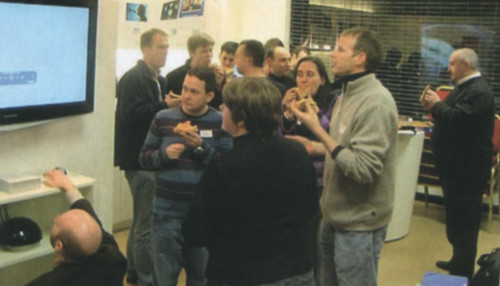
09:00 – Doors open, massive cheering and the people at the front start to enter. As the queue starts to move we get our first view into the store. As people enter they are cheered on by two rows of staff handing out free t-shirts. The cheering continued for everyone entering while we were in the store as well. Lot’s of energy and built up quite a good atmosphere.

09:15 – We’re in. I feel a bit embarrassed at the cheering but no matter – we’re here – lets get buying.

09:15-09:45 – The store is very nicely modernised. It feels a bit basic in some areas especially when you walk in and see the basic display tables with lot’s of iPods. However it feels spacious and the glass staircase is a triumph. I’m sure on a normal day the store will feel a lot less cramped than it did today. Roy did pick up his iMac and myself and Graham bought one of the new keyboards.

09:45 – Leaving the store and the queue still has at least a couple of hundred people in it with more still joining. Roy gets congratulated by members of the queue for his purchase. is there any other brand that attracts this loyalty? Looking around at the the trendy clothing stores what must they be wondering? Why didn’t their opening attract hundreds on a damp and dreary Saturday morning? Imagine how busy the iPhone launch will be!
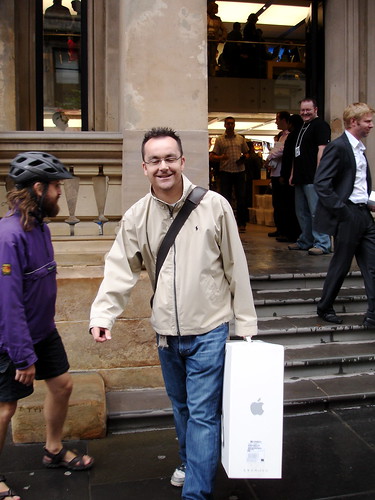
Roy leaving with new toys

So a great store and I’m glad there’s now one in Glasgow. It will make buying far too easy though. Although I was at first put off by the whooping and cheering it’s actually nice to see something a bit different and also to see such a passionate user community get a store to match their enthusiasm. Can’t see the same happening at a PC World launch for example. The staff themselves seemed helpful although understandably busy. I also liked the mobile till units that the staff used – makes purchasing a lot easier. Damn 😉

As for the keyboard, it’s a lot comfier to use than the existing one that came with the older iMac. It’s also helps accuracy, I guess as the keys actually have more space between them. I also prefer the shorter throw each key has. Not a bad way to spend £30 seeing as it’s the primary interface to the iMac. I’ve lost the wireless keyboard but gained two fast USB 2.0 ports that are easy to get to. I can understand why people were concerned initially about the keyboard but after spending a couple of hours with it I’m convinced that it’s a better design. Hopefully it won’t show the keyboard fluff as badly as the last design.

Almost forgot, full set of pictures from this morning available on Flickr.
.Mac Web Galleries

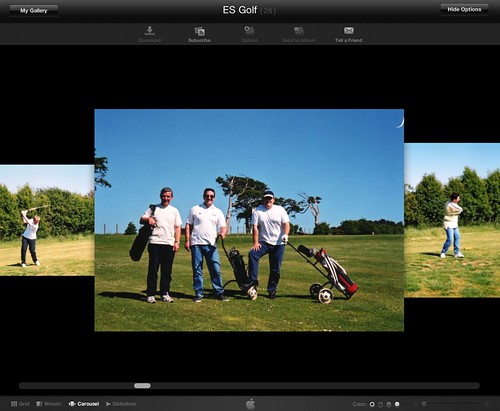
After all the hype I decided to try out the new Apple web galleries so I uploaded my first album. The upload speed seemed pretty sluggish as did the loading of the actual album on visiting the web page. Presentation on the website is superb though and it’s a great way of showing off your photo’s.

First .Mac Web Gallery

One of the nicest ways of viewing the album is using the carousel. This is like coverflow in iTunes and allows you to scroll through the pictures. Only annoyance is it takes a while for pictures later in the album to get the high res sharper version of the photo so you can spend a while looking at fairly fuzzy pictures. Another feature I like is that as you move the mouse over the album photo in the gallery page it flicks through the images in the album – very slick and mirrors the functionality seen in iPhoto.

While many have seen this as a Flickr competitor for me they are two different beasts. .Mac Web Galleries allow you to easily upload albums of photo’s (and also video’s) and let your friends view or download them. Flickr lets you do the same but with far more disk space and has a whole community supporting it with forums, groups and commenting. It also has far stronger tools for editing sets, albums and also supporting geo-tagging. One feature that .mac has got is photo uploading – letting people upload photo’s to your album which then sync back to iPhoto. I find that pretty odd as thats something I don’t think I would ever use. Due to space and speed alone I’ll be sticking with Flickr – be nice to see them up their game when it comes to presenting albums though.

Mac Announcements

Initial thoughts…

  • New iMacs. I don’t like them. The design isn’t as clean as the iMac’s of old. Not convinced by black surround or by glossy screen. Love the size of the new keyboards but would need to try them first as the key’s look close to the style of the Macbook. Fine for laptop – not so sure for desktop. Good options on hard disk size though.
  • iLife – some nice improvements here on photo management and also video creation. Not much else for me
  • iWork – Numbers look very interesting. Tried Keynote over the last few days and it is very impressive. Must try Pages to see how good/bad it is especially as Office is delayed until next year.
  • .Mac. Some improvements at last. Disk space upped to 10Gb which is nice. Was also impressed with the new picture and video albums – .Mac Web Gallery. Very clean presentation and it reallt does feel like an app on the web. Sharing options were also nice to see with friends able to upload photo’s with them sync’d back to your mac. A nice upgrade to .mac but still feel they could do so much more.

More meh than yeah for me but some nice changes all the same. If you commit to everything Apple I can see why it makes sense but with sites like Flickr and so many other websites established with communities it’s hard to see many people moving over to the web albums. Good for one off’s more than a whole set of albums for me.

Mac Rumours

So, my thoughts on Tuesdays announcements? We’ll see an iMac replacement. This was my worry when I first bought a Mac almost a year ago. It wasn’t the switch or the initial purchase. It was the upgrades the following year to lovely new hardware. However the iMac still feels new to me so I’m not too fussed. I guess we’ll see how true this is later in the week.

I expect something on iLife as well although that might come later on with Leopard. The one product I’d liek to see change is .mac. I bought it earlier this year and it’s been great for keeping the mac’s in sync. However the access over the web is lame compared to other Web 2.0 apps and the tiny 1Gb disk space makes a mockery of taking docs anywhere. Increased disk space, an improved range of apps and more than the ‘Back to mac’ functionality announced at a previous Leopard demo. How about a nice wrapper around the Google suite of tools coupled with the web disk. That would really make a portable office accessible from anywhere.

So that was much of the draft I wrote at the weekend. Now there’s speculation that there really could be some .mac announcements as there’s downtime scheduled on the .mac service during the keynote. I still have my doubts. Hey ho – we’ll all know this time tomorrow.

Who needs Apple TV?

Nullsoft have update Connect360 to play nicely with the 360’s spring dashboard update. While this is good news as after the update it was a bit buggy the best bit for me is that .mov files are now supported. Well, WMV+WMA, H.264 and MPEG4 are actually supported now which means the 360 alongside Connect360 can playback all my video podcasts plus movies stored on the Mac. Fantastico. I’m sure the Aple TV menu system is slicker and it’s obviously quieter but the 360 makes for a great free alternative which I already own.

Ruby Monday

The inner geek has been satisfied today. Since getting the Mac I’ve had an urge to do a bit of programming. Nothing fancy but I really wanted to play around with Ruby on Rails to see just ow easy it was to get a nice web app up and running. The only problem was getting a development environment. My web host offers Ruby skeleton and I couldn’t get command line access. No worries – install it all on the Mac. Todo that meant installing MySQL also. Firstly I followed the excellent post on Hivelogic, Building Ruby, Rails, LightTPD, and MySQL on Tiger. This takes you through everything you need to get Ruby up and running. This was also my first proper use of Mac terminal. I loved the following warning…

We trust you have received the usual lecture from the local System
Administrator. It usually boils down to these three things:

#1) Respect the privacy of others.
#2) Think before you type.
#3) With great power comes great responsibility.

Anyway, the install went well and I’m now at the point of starting to dabble but that will have to wait until later in the week. One final tip – there’s an excellent set of MySQL GUI tools available from the MySQL developers. Handy if your not familiar with command line MySQL.